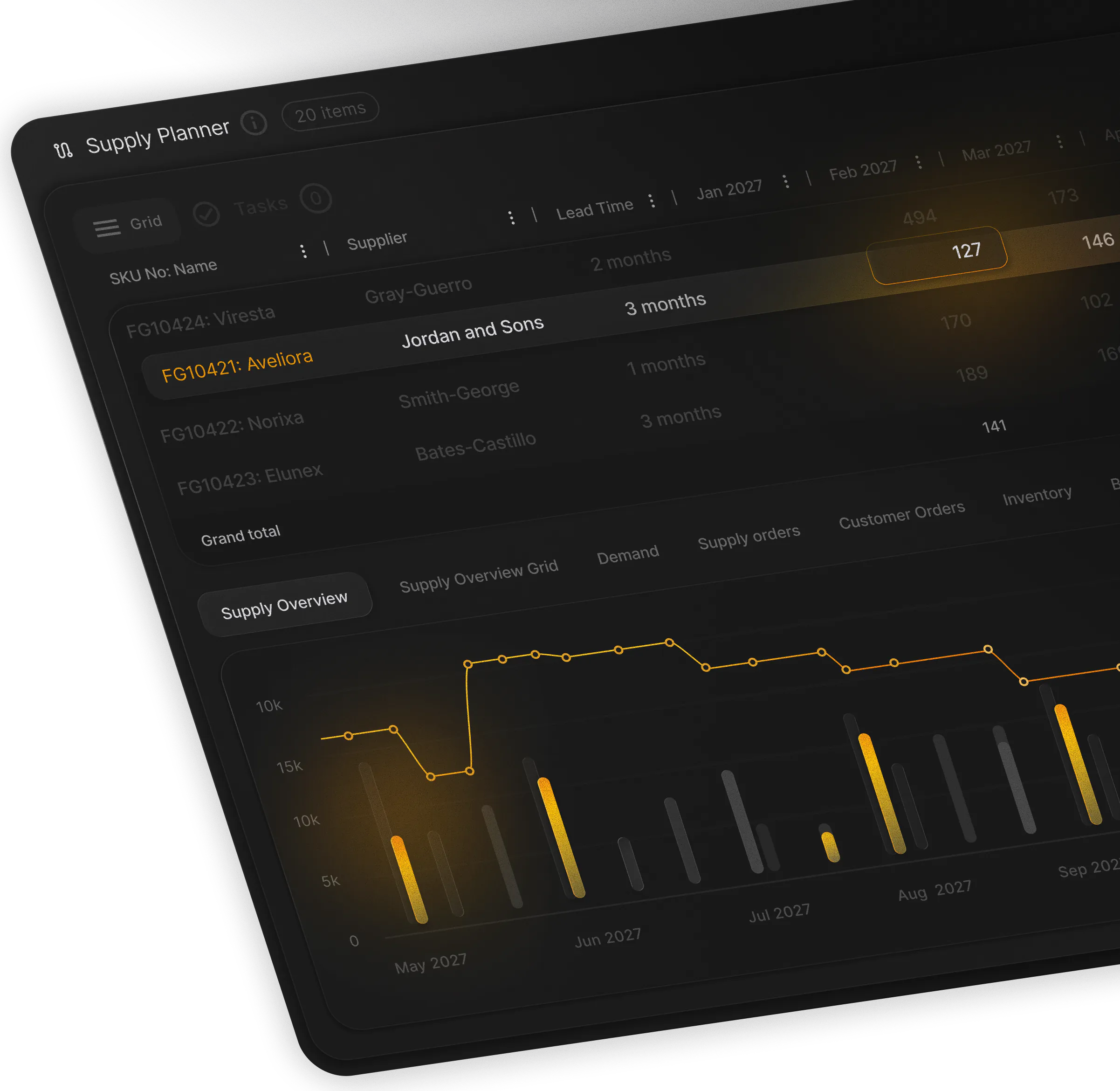


If you run SAP APO, you have stared at the 2027 slide in your strategic planning decks for years. It is no longer tomorrow’s problem, which is why 29% of surveyed organizations[1] identified the approaching end of mainstream maintenance as a primary external factor driving their S/4HANA plans. The clock is ticking down, and the operational implications of this critical transition are already knocking on our door.
Moving Beyond Spreadsheets
I have watched teams make the exact same mistake three times. They treat their new cloud planning tool as a blank container for their old logic. They open up a blank spreadsheet or a complex IBP layout and try to translate 14 years of custom macros line-by-line into key figures to survive the sap apo end of support 2027 milestone.
It fails because those legacy macros are not an active software specification. Half of those custom formulas were built in 2014 to handle manual exceptions for product lines you discontinued in 2019. Carrying them forward is a waste of time. When the new system becomes too difficult to configure, planners lose faith. Indeed, 70% of all software implementations fail[2] specifically due to poor user adoption. When they fail, planners retreat to what they know, and supply chain planning in Excel becomes your load-bearing planning engine. This retreat is common; one peer-reviewed study found that users routinely export ERP data to build external feral systems[3] because of their familiarity with personal tools.
To move beyond spreadsheets and transition safely to a modern alternative, complete these immediate checklist items:
- Audit formulas: Check your current spreadsheets for hidden GxP risks and broken macros that jeopardize compliance in life sciences.
- Assess tools: Contrast your manual setup using this guide on demand planning tools vs spreadsheets.
- Prioritize usability: Design a human-centric visual planning system that integrates next to your ERP without porting dead code.
Deploy These Nine Core Capabilities in Your SAP APO Replacement Strategy
To implement an effective sap apo replacement, look at what a planner actually needs to achieve operational control. Here is the blueprint of the nine core capabilities we designed into PLAIO to keep planners sane, organized, and focused on the physical flow of goods.
1. Map Your Supply Network without CIF Integration Complexity
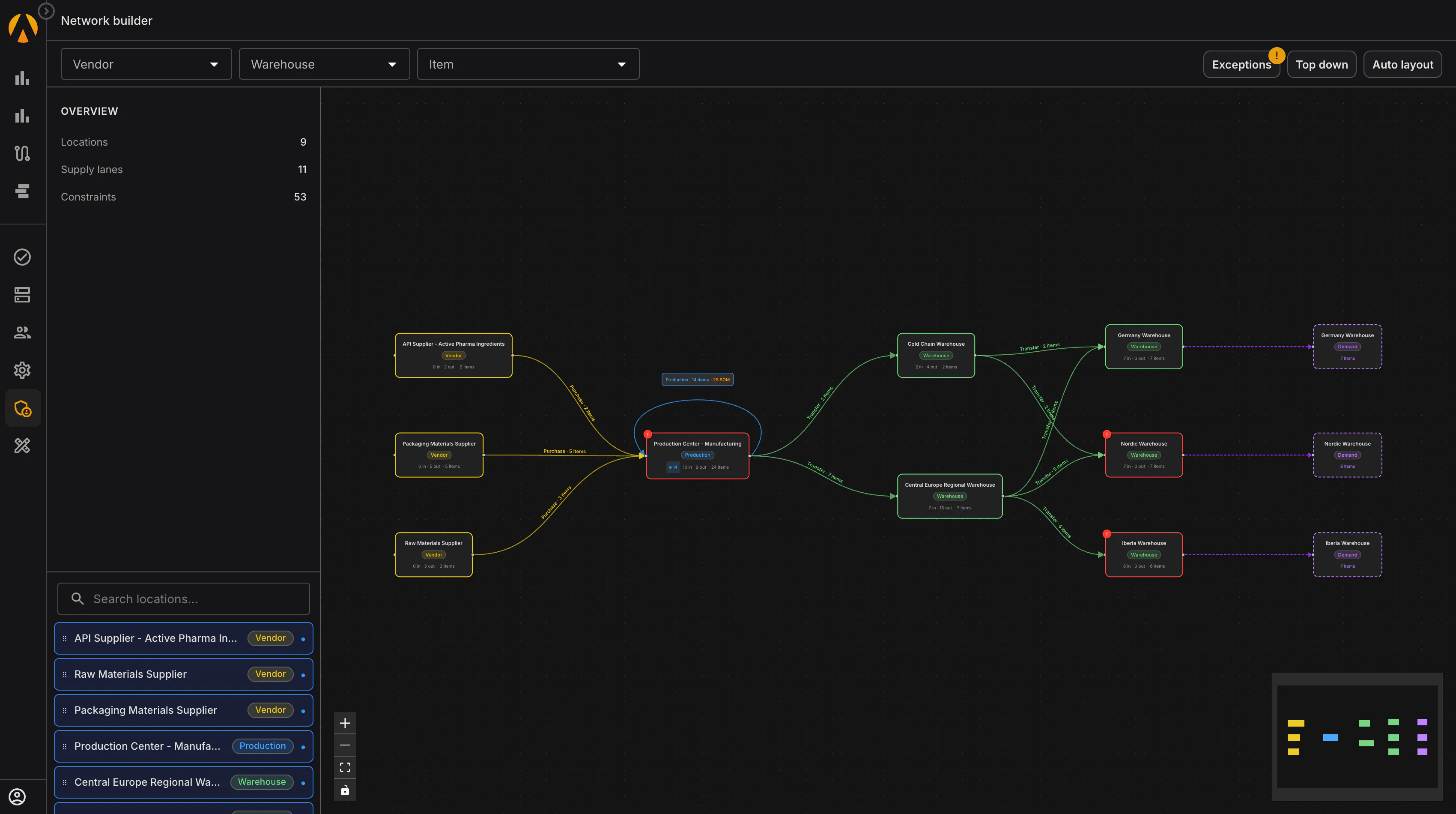
Managing your network in APO meant wrestling with CIF integration models, monitoring transactional queues, and running manual reconciliation reports. When CIF is discontinued, you need a way to make your supply network legible without the IT overhead, which is especially critical since only 6% of companies[4] have achieved full end-to-end supply chain visibility.
By using a visual, graph-based network builder, planners see every relationship — from active pharmaceutical ingredient (API) suppliers to packaging sites and regional warehouses — without running a transaction code.
2. Configure an Interactive Planning Grid without Rigid Change Requests
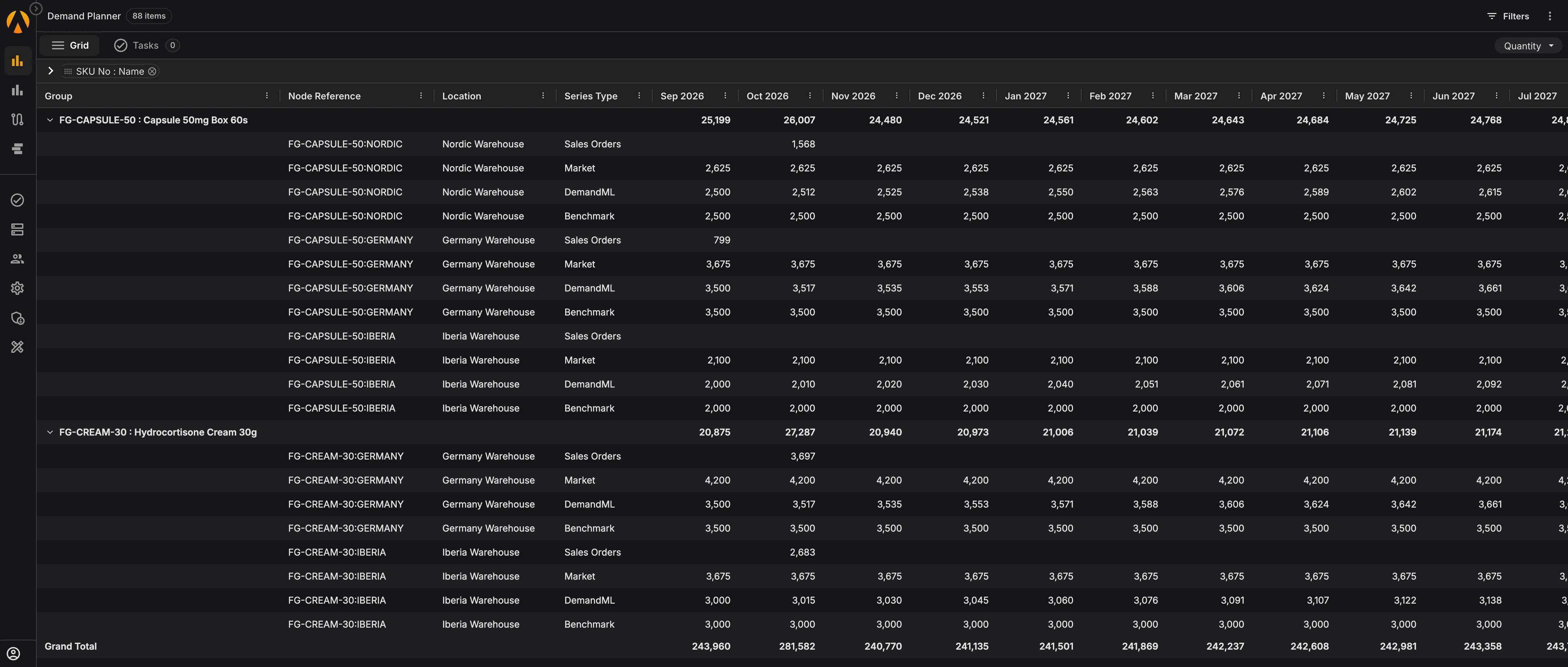
The original APO planning book was brilliant because it gave us grid-based, hierarchical views of our data. It was also terrible because changing a single row or adding a custom key figure required a formal IT change request. If your demand planning in the pharmaceutical industry is broken, it is because your tools are too rigid to adapt.
We kept the hierarchical layout planners trust, but made it simple to navigate, filter, and adjust on the fly without database engineering.
3. Calculate Rollup Forecast Metrics in Real Time to Eradicate Bias
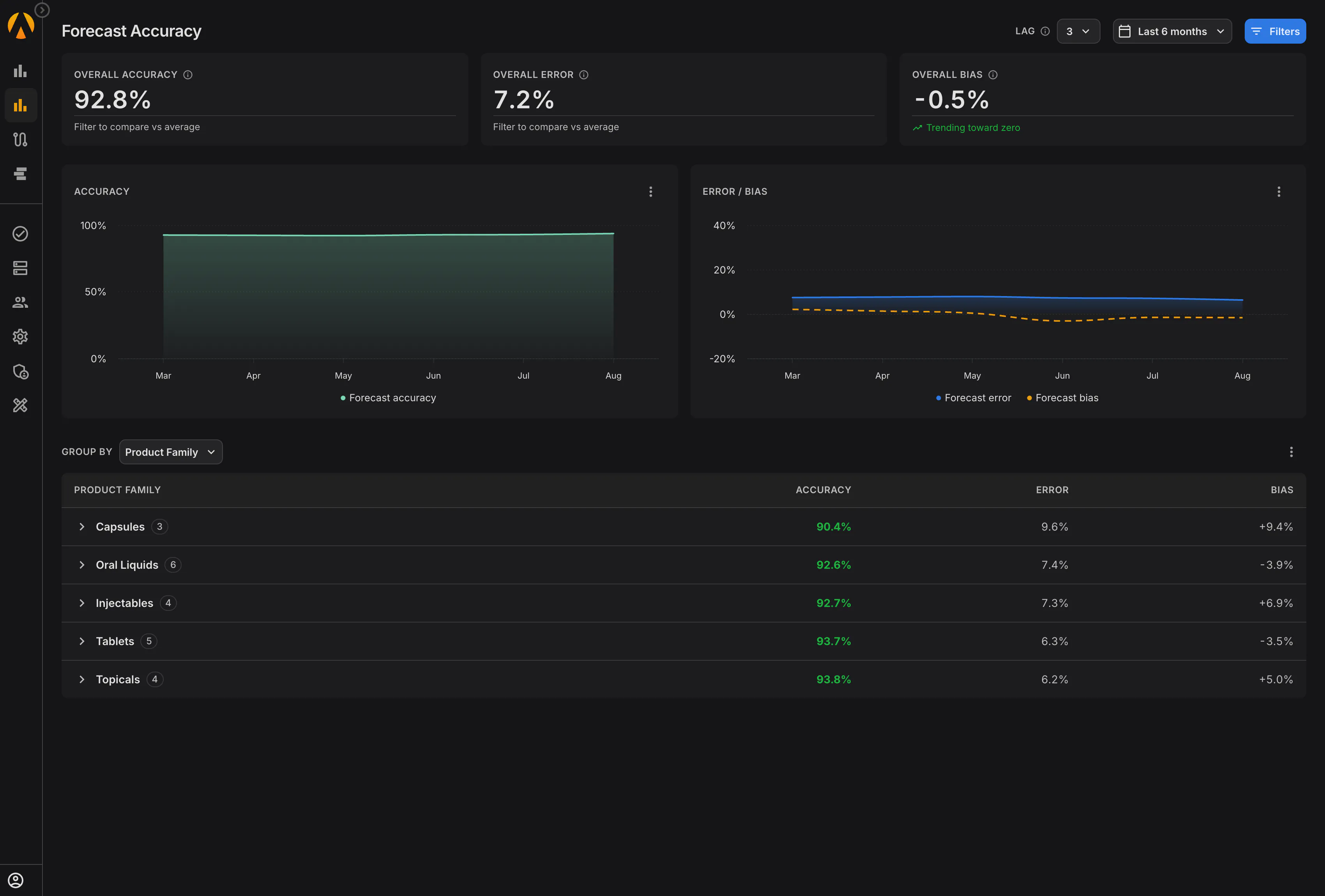
Evaluating forecast errors in APO meant exporting data to a BW cube, running a separate query, and waiting. Because the data lagged, accuracy reviews became a post-mortem instead of a decision tool. This friction is typical of historical execution; in fact, digital transformation success rates in traditional industries, including pharmaceuticals, range between just 4% and 11%[5]. This is a massive pain point for teams trying to manage consolidated global demand visibility across multiple markets.
To solve this, error, bias, and accuracy calculations must be integrated directly into the active demand planning screen.
4. Monitor Every Multi-Echelon Lane on a Single Unified Screen
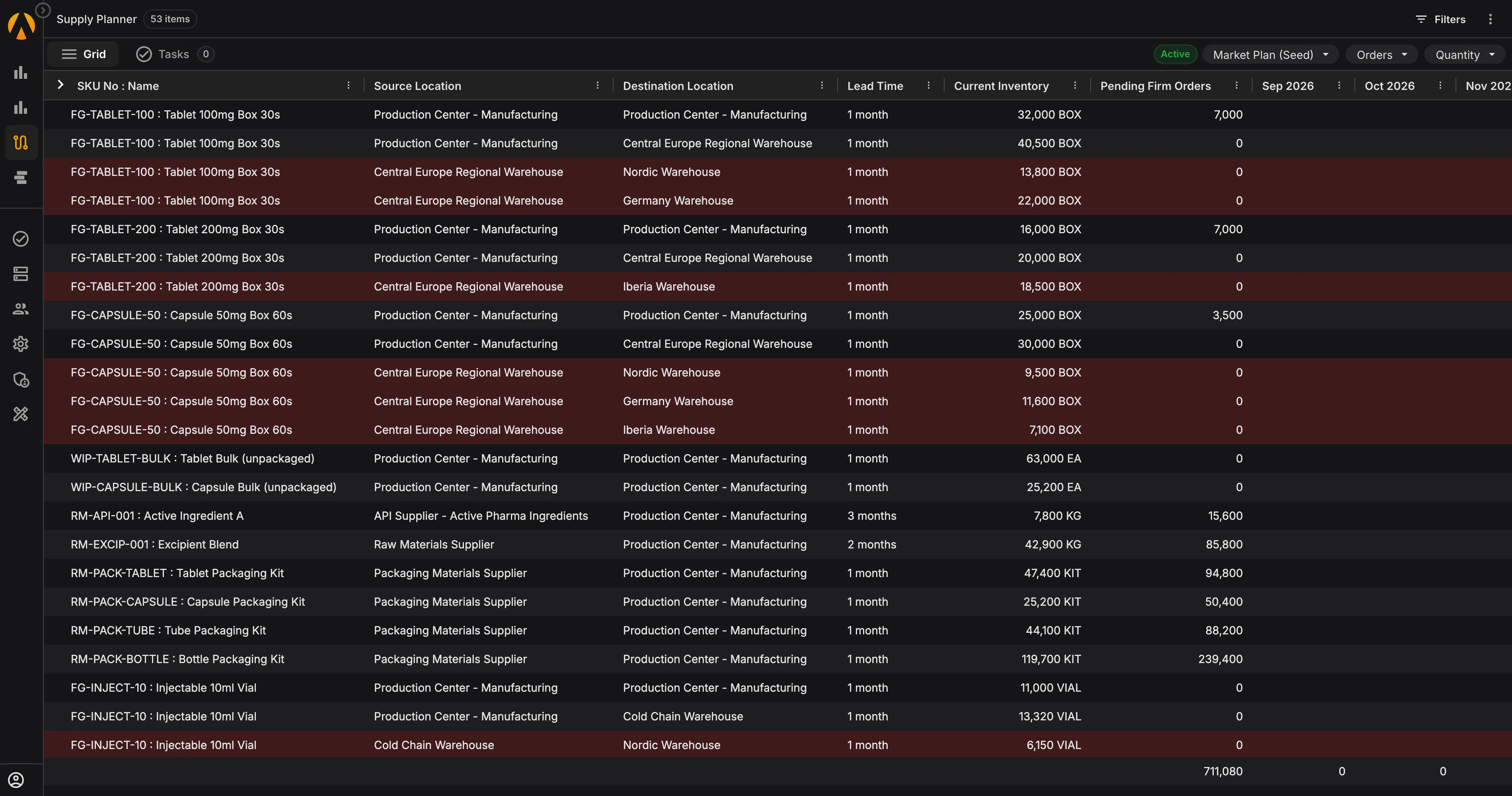
An SNP planner’s job is to balance inventory across the entire multi-echelon network. To do that, you must see every lane at once — lead times, on-hand stock, and firm orders — without clicking through multiple transactional screens or toggling between ERP layouts. Understanding this flow is essential to maintain the relationship between demand planning vs supply planning.
5. Prioritize Critical Exceptions to Eradicate Daily Alert Fatigue
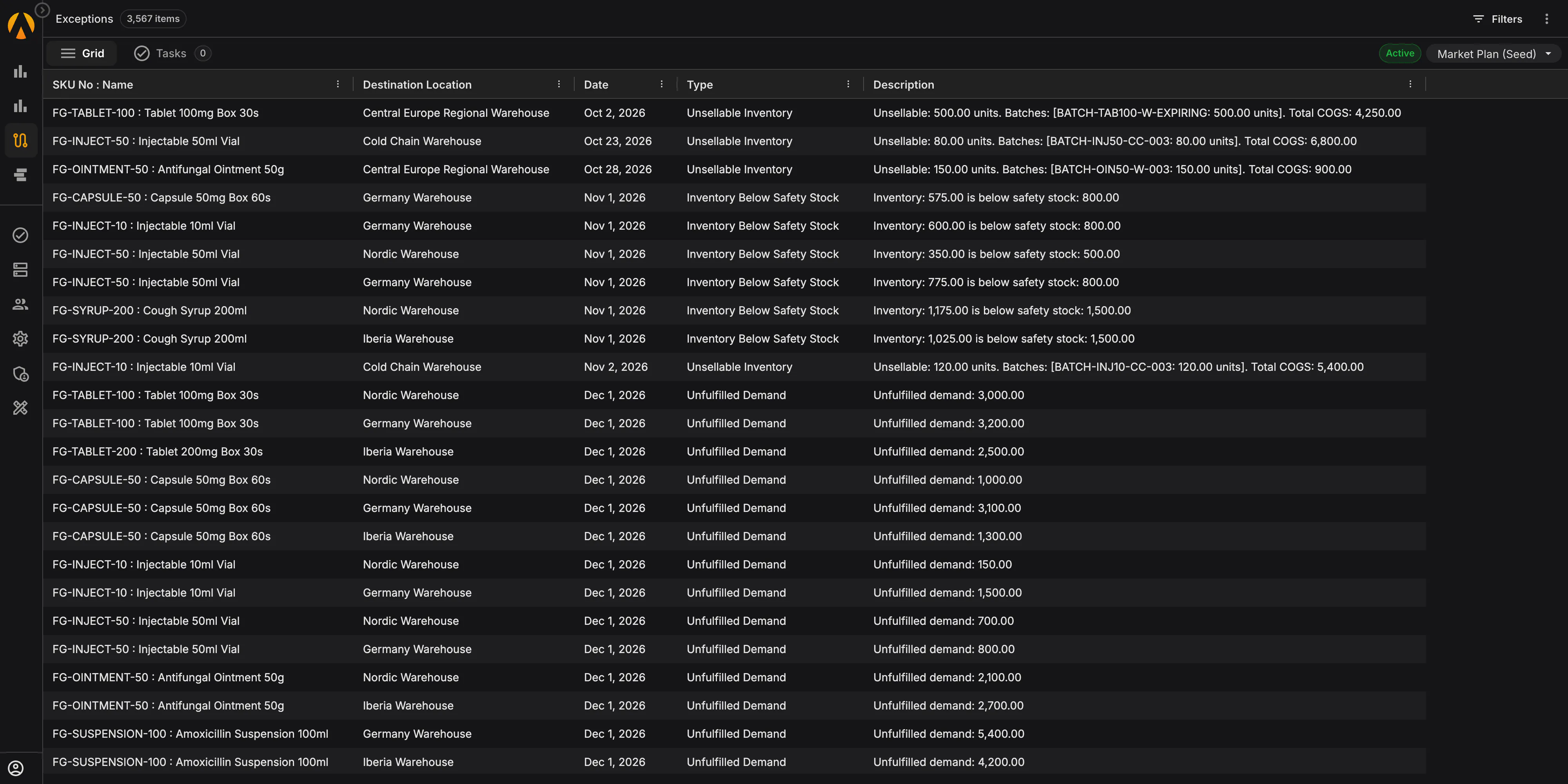
The APO Alert Monitor failed because it was too loud. It threw thousands of minor warnings every day, training planners to ignore the screen entirely. A modern exception engine replaces this noise with high-priority, cost-quantified business exceptions that define exact risks, helping to protect operations from disruptions that cost an average of $1.5 million per day[4].
6. Build Constraint-Aware Schedules with Interactive Sequencing Boards
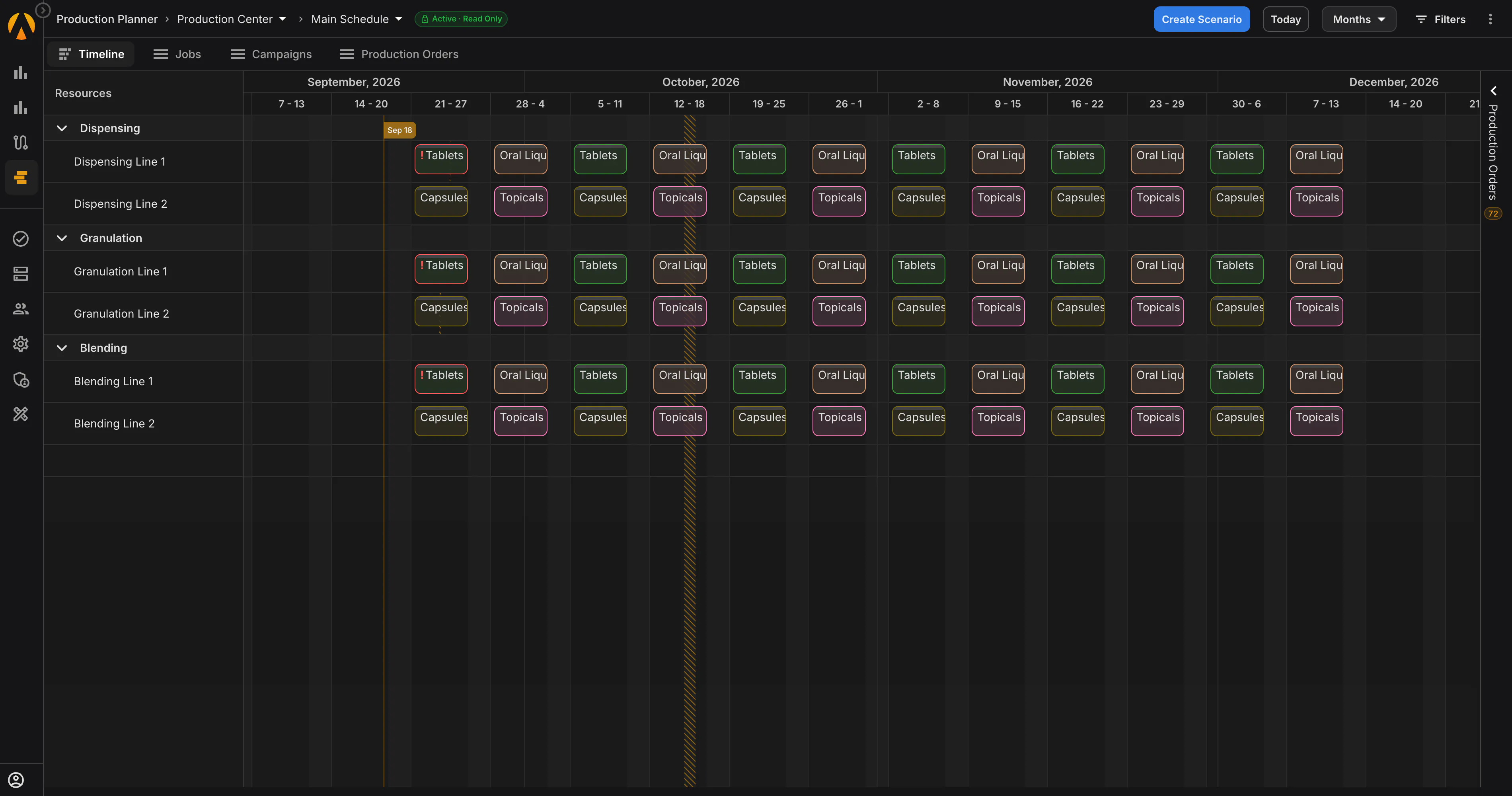
If you migrate to SAP IBP without planning for your detailed line schedules, you leave a massive gap. Scheduling is where campaign sequencing, equipment limitations, and cleaning rules live. Planners need a board that respects actual capacity constraints. To maintain shop-floor efficiency, implement visual shop floor scheduling to streamline execution.
7. Trace Batch-Level Expirations to Prevent Multi-Million Dollar Waste
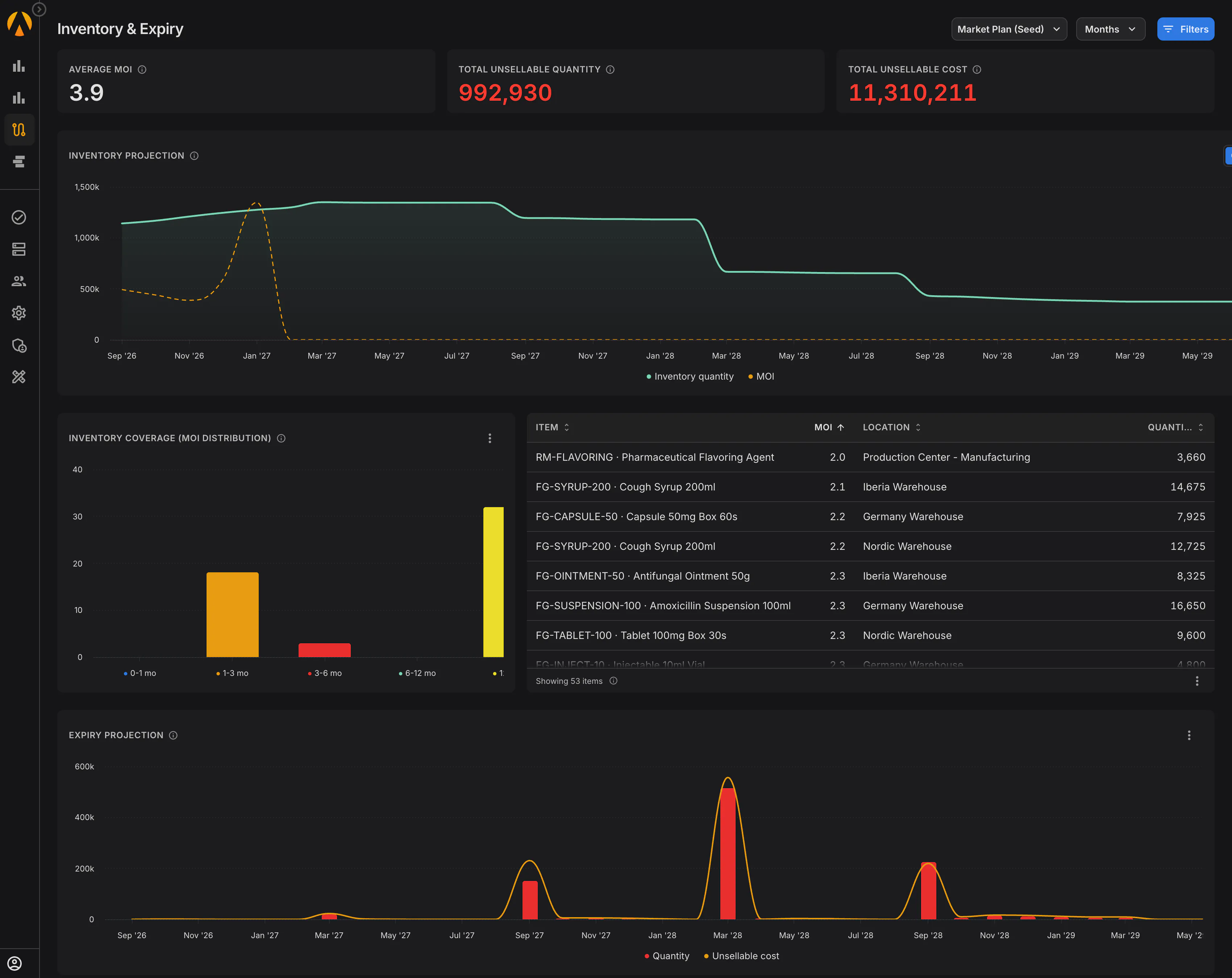
This is a capability that SAP APO never provided out of the box. Managing minimum remaining shelf life for specific markets requires a massive, offline spreadsheet. When replacing your planning stack, you cannot afford to leave this risk unaddressed.
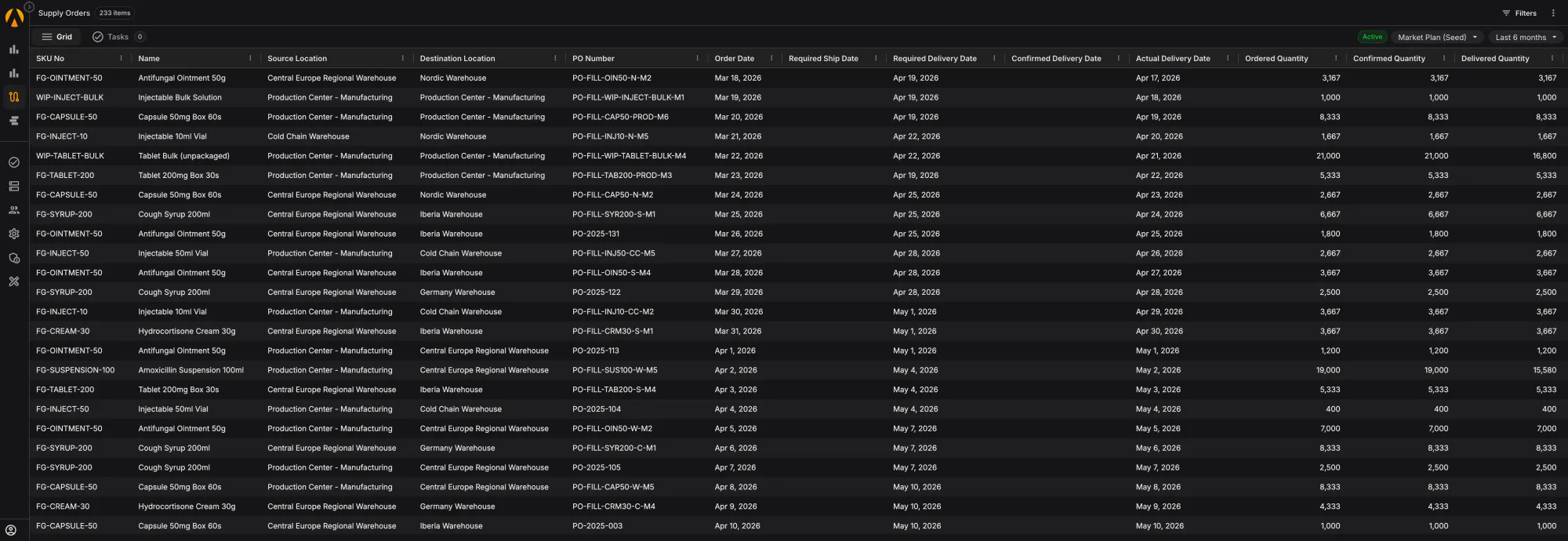
8. Publish Planning Decisions Directly Back to Your ERP as Draft Requisitions
Your ERP must remain your single source of financial and transactional truth. I do not want to move execution out of SAP. What we need is for the decisions made in the planning layer to flow back as clean, draft documents instead of manual emails.
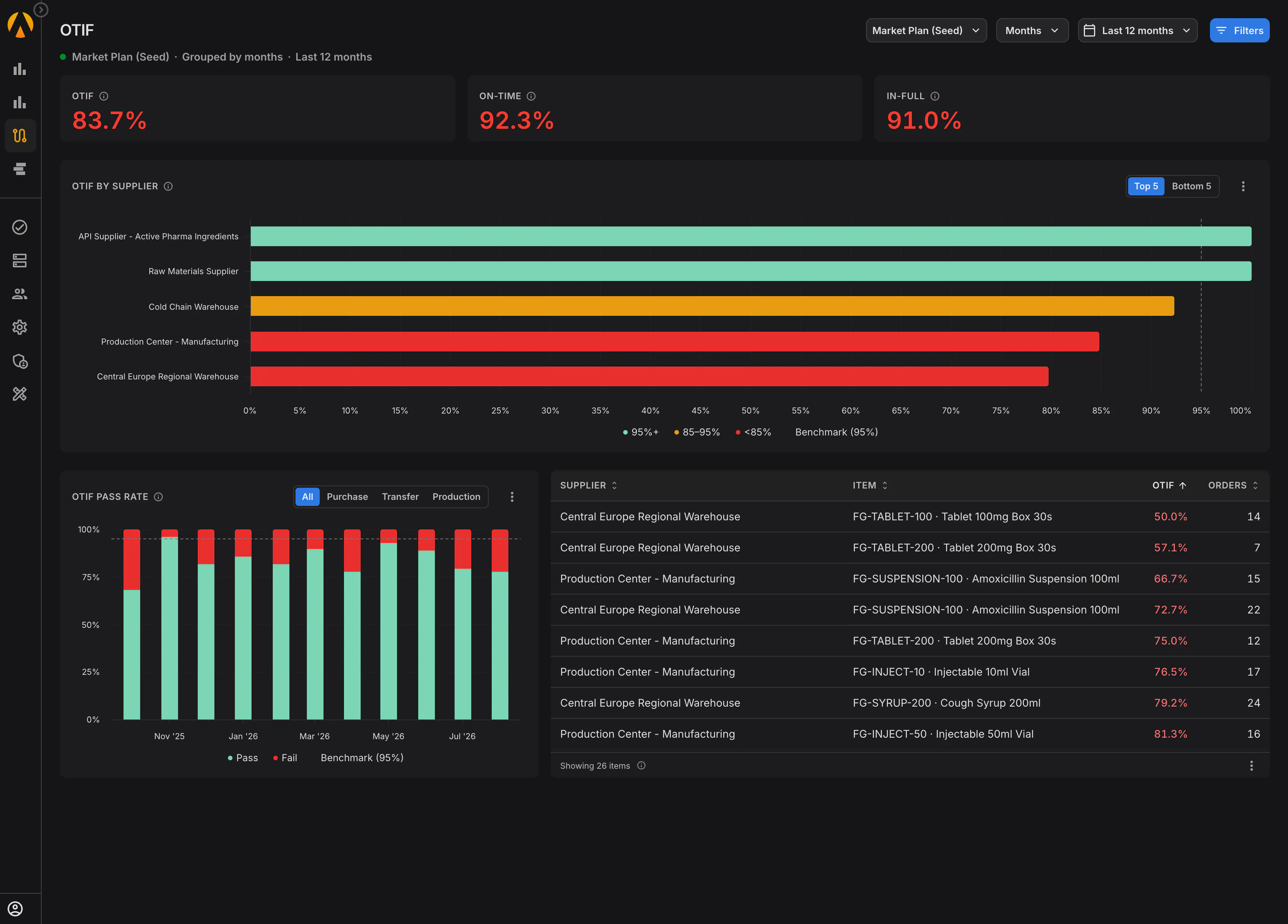
9. Measure On-Time In-Full Delivery Performance to Prove ROI
When the steering committee asks if your APO replacement project succeeded, “our planners are happier” is not enough. You need clear, hard metrics to prove that your new planning workflows are improving supplier and warehouse performance.
Addressing Technical Objections to the APO to IBP Migration
Objection 1: Refute the “Additional Integration” Concern with Simple Modern APIs
IT directors rightly argue that introducing an external planning layer adds another system to manage, increasing integration footprint. However, you are losing CIF regardless of your path. Rebuilding CIF-equivalent logic to sync master and transactional data across two different SAP target platforms — SAP IBP and S/4HANA — requires massive custom middleware development during an apo to ibp migration. The cleaner architecture is to utilize a single, pre-built standard integration layer. Connecting S/4HANA to a unified planning layer via a secure PLAIO SAP S/4HANA integration unifies your data payloads, eliminates native ECC queue locks, and radically simplifies your long-term maintenance overhead.
Objection 2: Preserve Your ERP’s Validation Audit Trail with Draft Requisitions
IT operations fear that moving planning calculations outside the ERP breaks GxP compliance and database version control. This objection holds true if the external system executes financial ledger or inventory transactions. But it does not. The planning layer functions strictly as a simulation workspace to model constraints, balance inventory, and evaluate scenarios. Once my team approves a plan, those decisions flow back to S/4HANA as draft requisitions, which your ERP validates before execution. Every manual override, assumption shift, and S&OP alignment decision in the planning workspace is logged with an absolute, untamperable version history, ensuring GxP compliance and full auditability.
Objection 3: Leverage S/4HANA PP/DS for Plant Sequencing While Unifying Global Planning
IT divisions argue that since S/4HANA contains embedded PP/DS, they get production scheduling “for free” without needing third-party tools. Yet, actually getting onto the new core remains a sluggish process; survey data shows that only 32% of organizations have transitioned to SAP S/4HANA[6]. Furthermore, embedded PP/DS excels at single-plant, machine-level line sequencing but operates in a silo. In fact, a peer-reviewed study in the pharmaceutical industry highlighted critical post-implementation utilization challenges[7] after SAP ERP deployment, illustrating that a standard rollout can leave major operational gaps. It cannot handle multi-market demand aggregation, multi-echelon network inventory optimization, or global contract manufacturing (CMO) lead times. Forcing these network-level S&OP decisions into a plant-centric sequencing engine breaks global visibility. By pairing S/4HANA’s execution with a unified, cross-network layer, you get the best of both worlds: local execution and global consensus demand planning.
Objection 4: Accelerate GxP Validation Using Specialized Pre-Configured Templates
IT compliance teams expect validation of a new planning tool to trigger a slow, high-risk IQ/OQ/PQ validation cycle. This is a massive headache with legacy systems because validating custom ABAP macros inside a heavily modified S/4HANA instance requires bespoke, manual testing scripts. Modern, pharma-native SaaS platforms eliminate this drag. By deploying pre-validated, GxP-compliant onboarding templates and using automated continuous validation models, we run compliance checks automatically. This reduces GxP validation timeframes from nine months to just a few weeks.
Execute this Pragmatic 12-Month Transition Strategy Chronologically
Instead of a massive, multi-year IT migration that puts your operations at risk, I recommend a structured, decision-focused transition plan. The order of these steps matters far more than the timeline:
- Inventory and Cull Your Macro Library: Audit every macro in your APO system. Identify who built it, when it changed, and if it still influences live S&OP decisions. Delete obsolete macros to reduce migration complexity in your data management workflow.
- Separate Your Operational and Tactical Roles: Classify decisions as either network-level tactical (S&OP) or plant-level operational (scheduling). Dictate software architecture based on operational boundaries, not product roadmaps.
- Model Your Live Network with Real Data: Load active locations, item master records, bills of materials (BOMs), and real-world lead times into your planning layer. Do not validate your system using fake mock data.
- Run a Parallel Trial on a Single Product Family: Keep legacy APO running while executing a full planning cycle inside your new system. Reconciling forecasting variances between the two setups is where the real learning happens.
- Integrate and Automate the ERP Feedback Loop: Push approved planned orders and transfer requisitions back to your ERP only after your parallel trials have run successfully for at least two consecutive cycles.
Align Your Organization to Address Non-Systemic Supply Chain Hurdles
Let’s be completely honest about the limits of technology. A new planning tool will not fix bad master data, which remains a massive risk given that only 53% of supply chain leaders[4] rate their master data quality as adequate. It will not fix an undisciplined forecasting culture, and it will not stop commercial sales teams from submitting unrealistic demand figures. Those are human and organizational challenges, and no software can solve them for you.
What a modern planning layer will fix is the critical structural issue at hand: the fact that your core planning engine is reaching its end of life, the experts who maintain your macros are retiring, and the vendor’s solution is a costly, complex rebuild.
I would rather spend that budget on a modern, flexible system that my planners can manage, adjust, and own themselves. If you are preparing your exit from SAP APO, the best first step is to look at your actual supply network and data. I invite you to request a personalized demo with one of our pharma supply chain specialists to see how we can make your transition smooth, practical, and successful.
References
- “SAP S/4HANA Migration Benchmark Report 2022.” SAPinsider, 2022. https://enosix.com/wp-content/uploads/2024/08/SAPinsider-2022-05-SAP-S4HANA-Migration-Report-6299.pdf
- Chatelier, Benoit. “Why 70% of Digital Transformation Projects Still Fail in 2026.” MeltingSpot, 31 October 2025. https://meltingspot.io/en/blog/why-digital-transformation-projects-fail
- Newman, No'am. “Spreadsheets in an ERP Environment: Not What the Doctor Ordered.” 10 March 2015. 2nd Workshop on Software Engineering Methods in Spreadsheets. https://arxiv.org/abs/1503.02997
- “Supply Chain Statistics — 70 Key Figures of 2026.” Procurement Tactics, 2026. https://procurementtactics.com/supply-chain-statistics/
- “105+ Digital Transformation Statistics and Strategies for Success in 2026.” Mooncamp, 13 May 2026. https://mooncamp.com/blog/digital-transformation-statistics
- “SAP S/4HANA Migration 2025.” SAPinsider, February 2025. https://sapinsider.org/research-reports/sap-s-4hana-migration-2025/?hs-embed-af=t
- Khaldi, Mariah; Cherif, Redouane Amine; Belmekki, Houssem. “Identification of utilization deficiencies post SAP enterprise resource planning implementation in the Algerian Pharmaceutical Sector.” 14 November 2024. https://pubmed.ncbi.nlm.nih.gov/39549785/