Exception Management

Pharma Supply Chain Exception Management That Focuses Attention Where It Matters

Stop chasing issues. Act on the ones that matter most.

Book a demo

Spot the families that moved

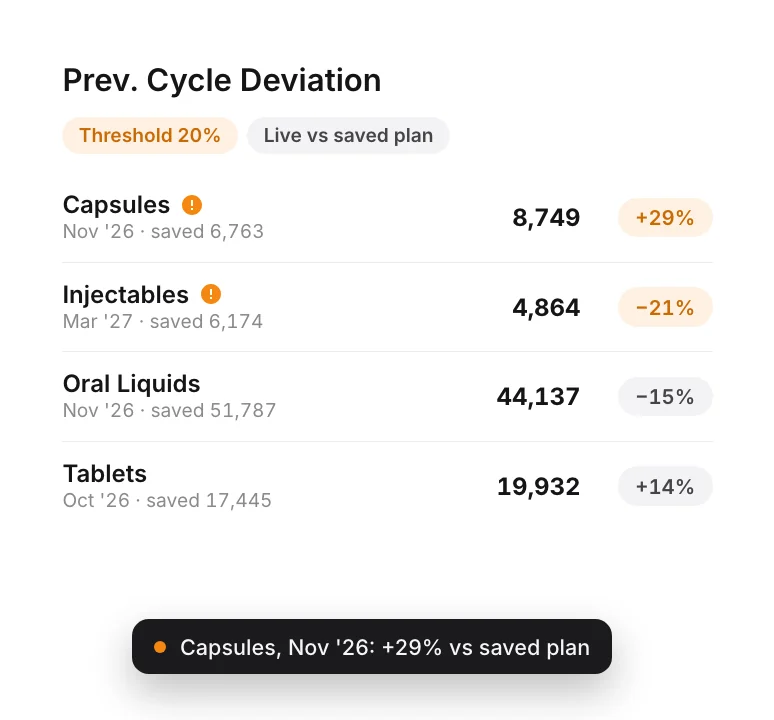
Any product family where the live plan has drifted more than your 20% threshold from the saved plan gets a marker.
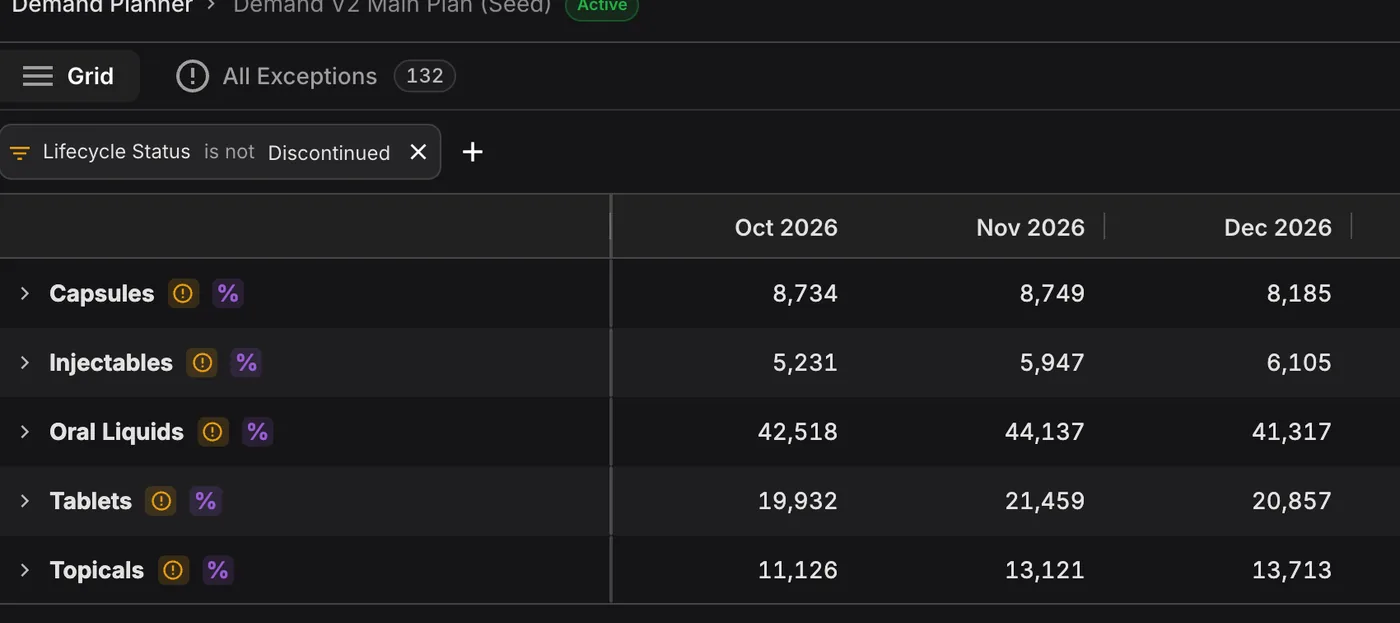
See which families moved. A marker on every product family where the live plan drifted past your 20% threshold from the saved plan.

Smart alerts for smart prioritization

Effective supply chain exception management is not about getting more alerts; it is about seeing what's actually critical. PLAIO checks your entire plan every time it is calculated and surfaces the exceptions that impact patients, supply, and revenue.

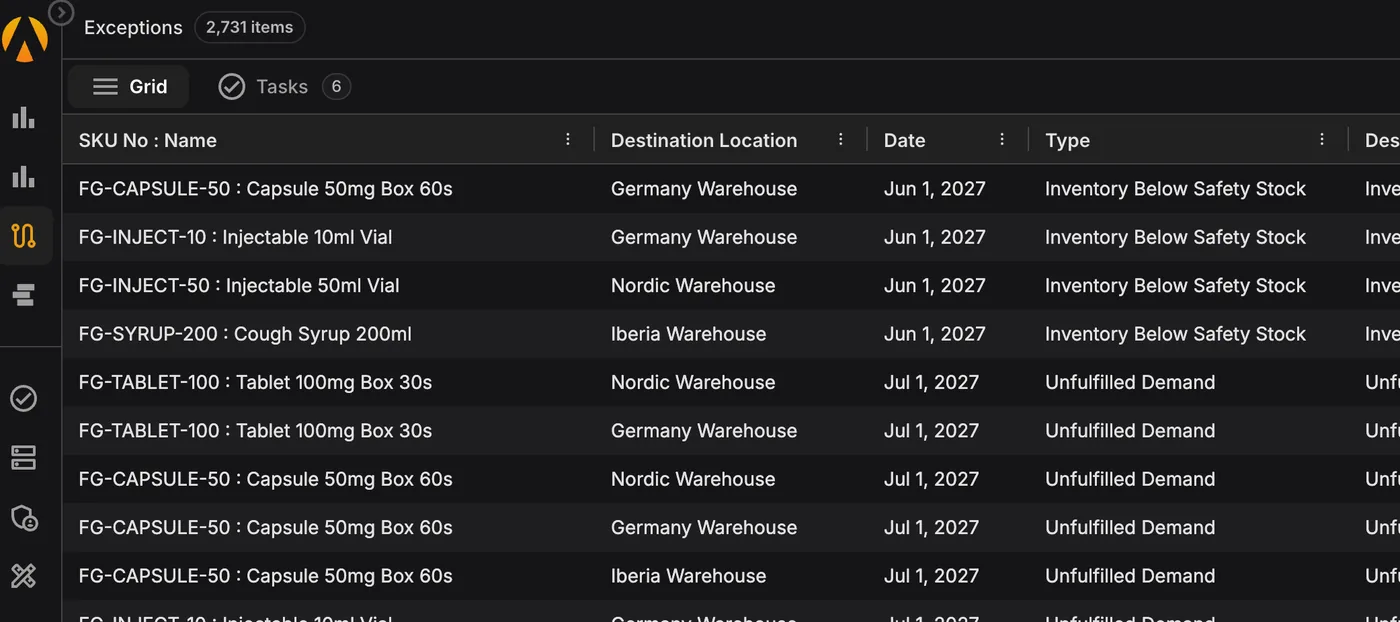
Each exception comes with a date, a SKU, a location and the numbers behind it.

It might be a stockout in July, or a batch that will be unsellable by next spring. All of them come out of the simulation that builds your supply plan. Change the plan and the list changes with it.

Filter the list down to your own products and locations. Then start with the earliest problem and work forward.

Why it matters:

Time spent hunting for problems comes out of the time left to fix them. With the list ready on Monday, planners can get to a shortage before a customer feels it.

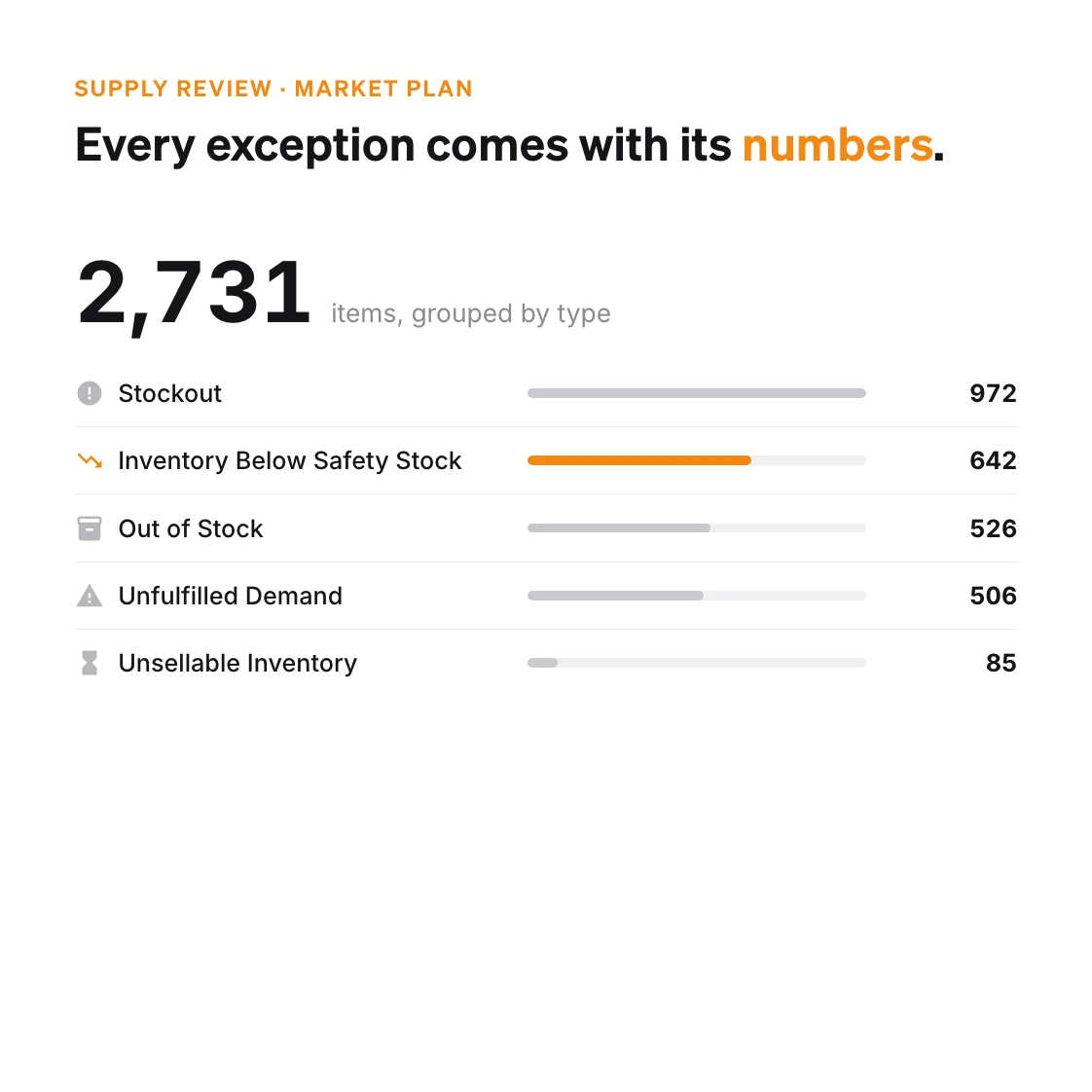
Every exception comes with its numbers: exceptions for the Market Plan grouped by type, 972 stockouts, 642 inventory below safety stock, 526 out of stock, 506 unfulfilled demand and 85 unsellable inventory, with FG-SYRUP-200 at Iberia Warehouse highlighted at 77 units against a safety stock of 1,500

How PLAIO narrows the list

Previous cycle deviation against a 20% threshold: Capsules in November up 29% and Injectables in March down 21% on the saved plan are flagged, Oral Liquids and Tablets are not

Prioritize Exceptions That Matter

You set the threshold your team acts on. The Demand Planner then flags only the months where the live plan has moved past it since the last saved version, which keeps small wobbles off the list.

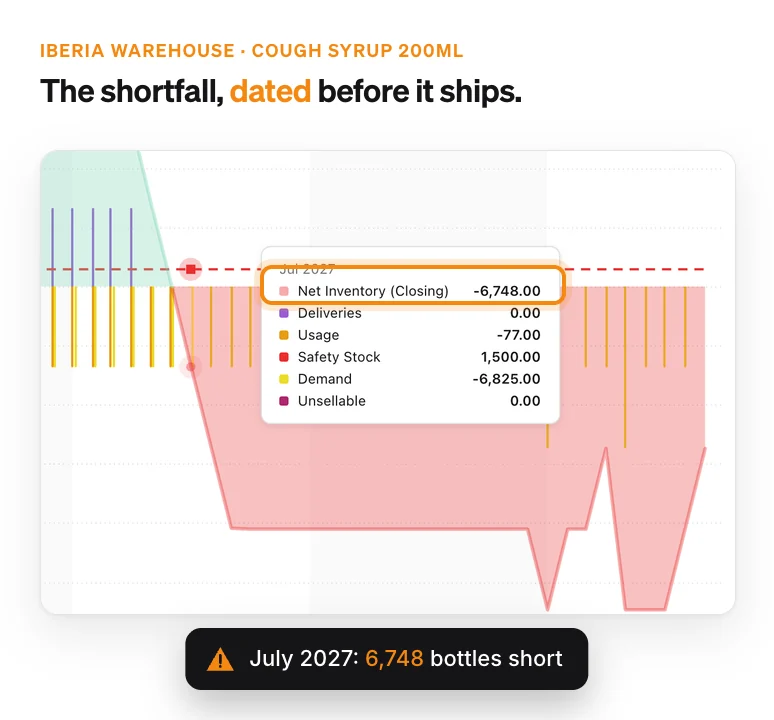
Inventory chart for Cough Syrup 200ml in Iberia running out, with July 2027 showing 6,748 bottles short against a safety stock of 1,500.

Detect Issues Early

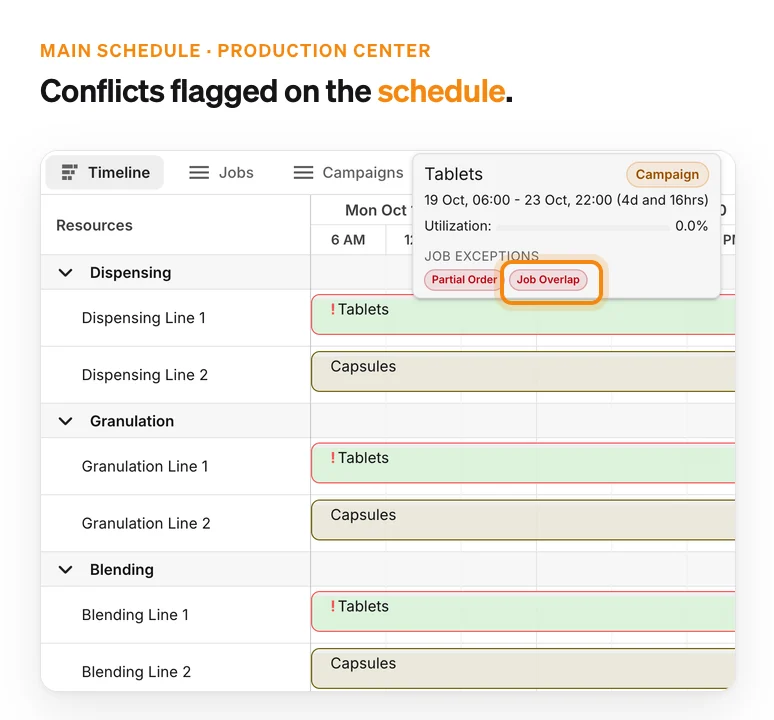
Get visual alerts for stockout risks, production delays, and supply constraint violations before they cascade into bigger problems, plus batches that will expire before they are used, with units and COGS.

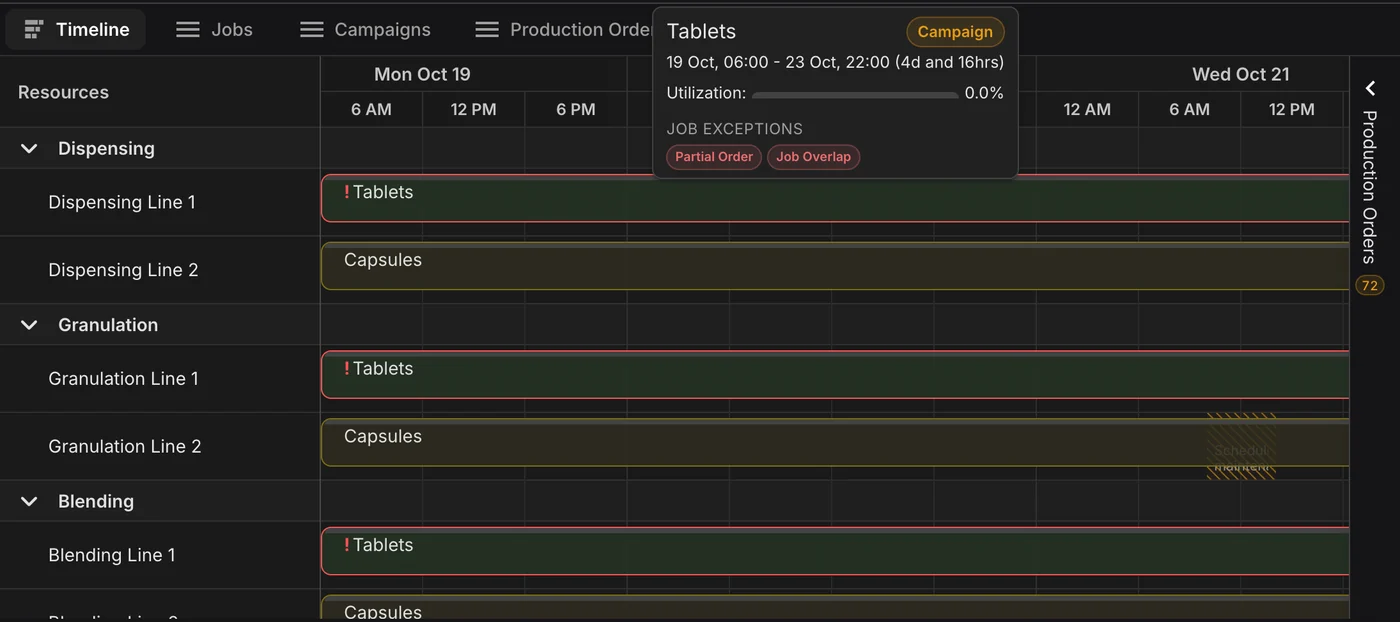
Production schedule with the Tablets campaign flagged on three lines and its tooltip listing a Job Overlap.

Understand the Root Cause

Trace every exception back to its driver across your demand, supply, or production plans to fix the underlying issue, not just the symptom.

How exception management works in PLAIO

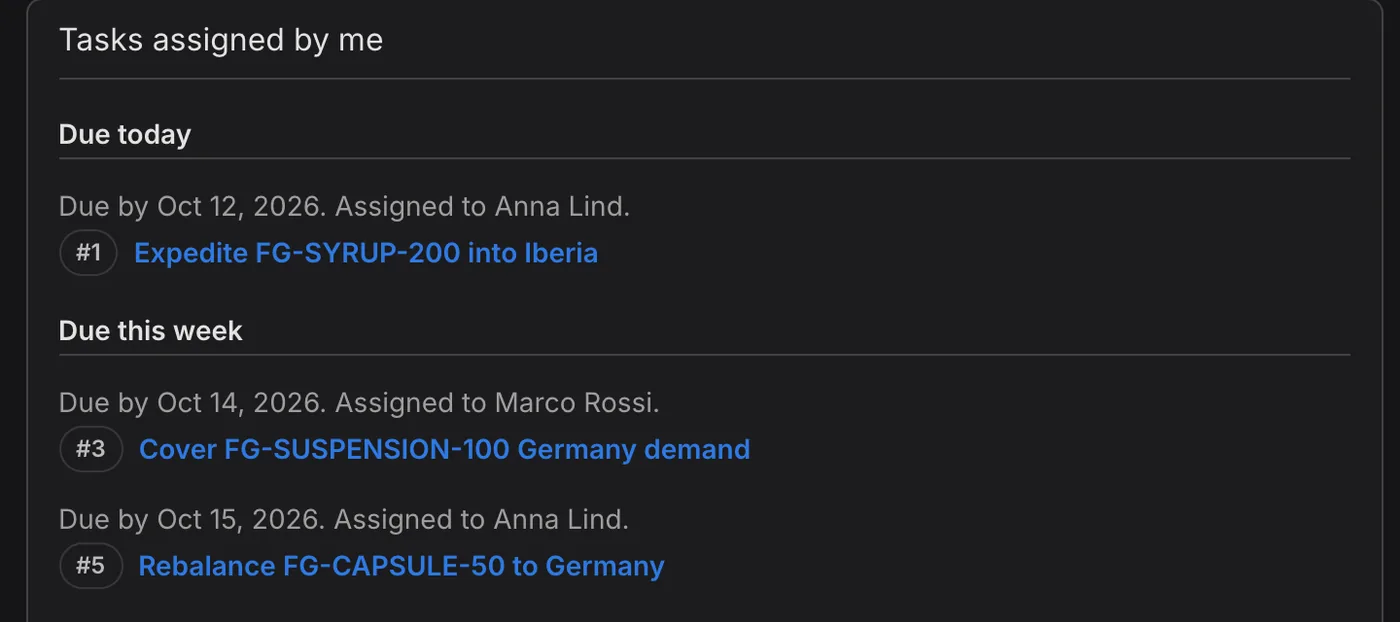
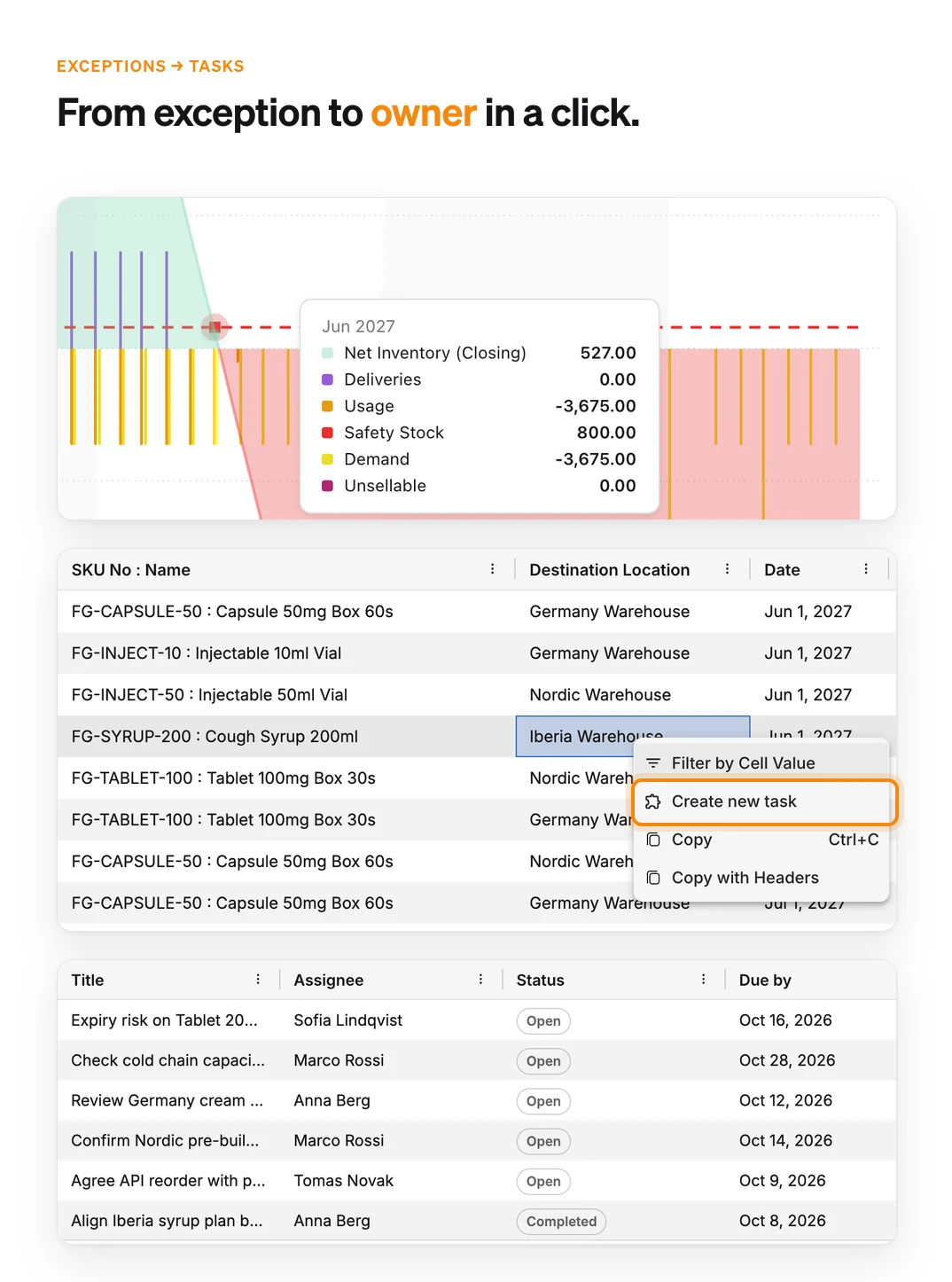
An inventory chart flagged below safety stock, the exceptions list with the right-click option to create a task, and the team's tasks with owners and due dates.

Demand

Exception management for demand monitors forecast deviations from your last saved plan against the threshold you set, and flags sales orders that exceed the forecast. Planners are alerted early to risks that could disrupt supply continuity.

Supply

Supply exceptions cover material shortages, order capacity violations, stock below safety stock and expiring inventory. They come out of the same simulation as the plan. The list is sorted by date, then type, with unfulfilled demand and stockouts at the top.

Production

Each schedule version is checked for clashes and late orders, along with broken rules such as a missing changeover or a wait that runs too long. Right-click an exception to make it a task with an owner and a due date. The task stays linked to its row.

If you lead a planning team

Key capabilities at a glance

  • Shortages, expiry and service risk, flagged while they are still months away.
  • A list ordered by date and type, so the urgent items sit at the top.
  • Any exception can become a task with a named owner.

Why it matters:

The risks for S&OP are already listed, and each has someone responsible. Nobody has to build that list the night before.

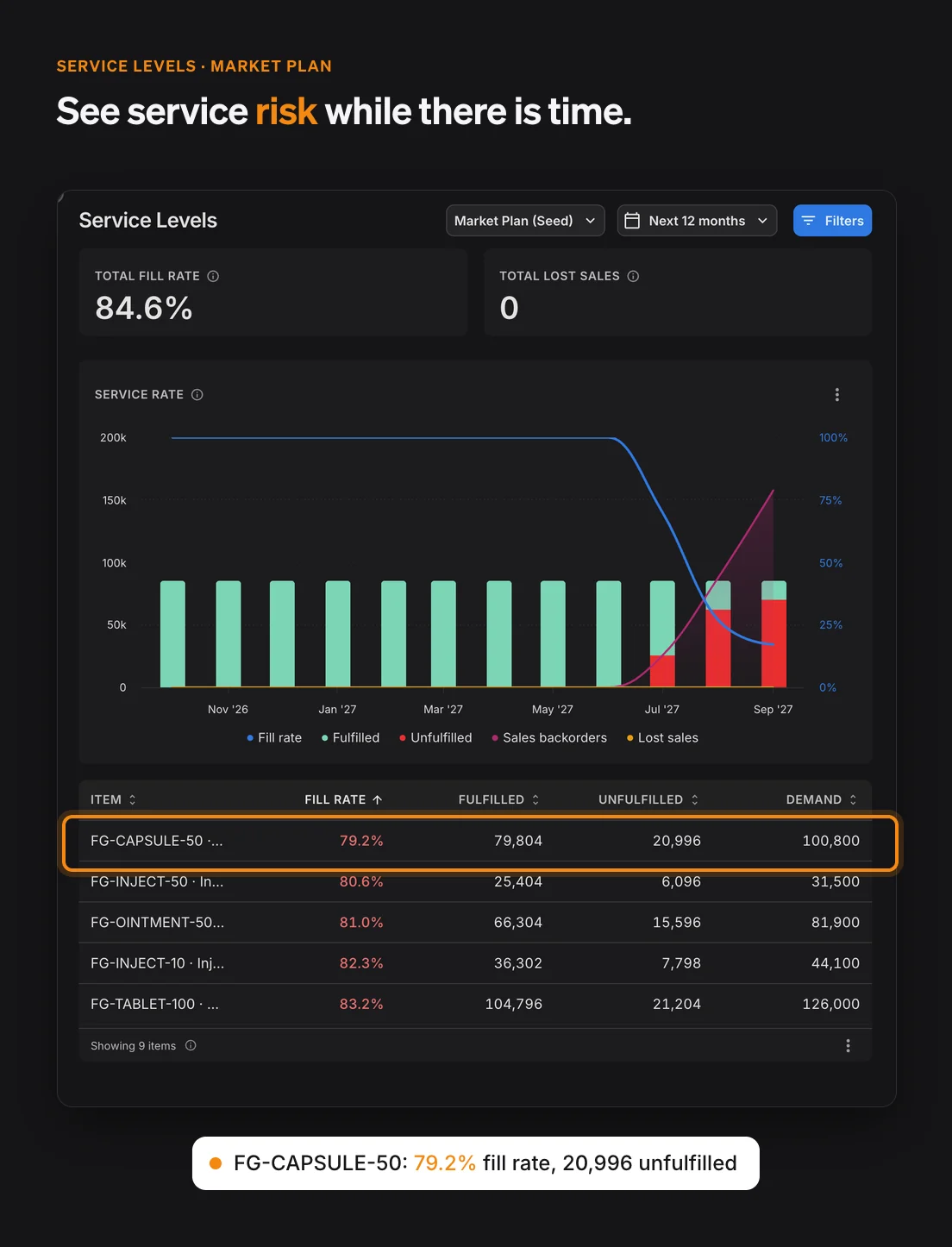
Service Levels dashboard for the Market Plan: 84.6% fill rate, unfulfilled demand appearing from July 2027, and the items at risk led by Capsule 50mg at 79.2%.

Exception Management FAQ

It means planning by exception. The software reads the whole plan and lists only the places where a planner is needed. In PLAIO that list covers demand, supply and production. Each entry has a date and points to the item, location or order concerned.

Supply planning raises stockouts, out of stock, unfulfilled demand, inventory below safety stock, shortages and component shortages, and unsellable (expired) inventory. It also flags overdue supply orders still counted as expected, MOQ, IOQ and max order capacity violations on edited orders, and sales orders above the forecast. Demand planning flags months where the live plan has moved further from the last saved plan than your threshold. Production scheduling flags job overlaps, late orders, min and max wait violations, not enough changeover and material not ready.

The list is sorted by date first. Within a date, unfulfilled demand and stockouts come before policy and data findings, and you can filter by type, item, product family or location. You also set the demand deviation threshold yourself. If your team only acts on 20%, a 5% wobble stays off the list.

No. Supply exceptions are produced by the simulation that builds the supply plan. Change an order or a policy and recalculate, and the list updates. Each row gives the numbers, such as inventory against safety stock, or which component is short and by how much.

Yes. Right-click the row and create a task with a title, a description, an assignee and a due date. It stays linked to the row, which shows a task count. On the Tasks page each person sees their work sorted by due date, with overdue and unscheduled tasks kept apart.

Where service is at risk, by SKU, location and date, before an order is missed. The same list shows inventory heading for expiry and what it cost. The Tasks page shows who owns each issue and what is overdue. Because it all comes from the plan, nobody has to put together a separate risk report each week.

Focus only on what truly matters

Surface high-impact risks early and resolve them before they disrupt patients, revenue, or operations.

Book a demo

Cookie settings

To enhance your experience on our site and to analyze traffic, we use cookies. By clicking "Accept All," you agree to the storing of cookies on your device for analytics purposes. You can manage your settings or learn more in our Privacy Policy.

Manage Settings
  • Your Privacy Matters to Us

    We use cookies to improve your browsing experience and analyze how our website is used. These cookies allow us to understand trends, monitor website traffic, and gather insights to make the site better for you.

    We respect your privacy and are committed to transparent data usage.

    Why Do We Use Cookies?

    Necessary Cookies: These ensure that the website functions properly.

    Analytics Cookies: These help us track site traffic, user behavior, and performance metrics. The data collected is anonymous and allows us to continuously optimize the site.

    Preferences Cookies: We may use cookies to remember your preferences and tailor your experience.

    Marketing Cookies: We may use cookies for marketing purposes.

    Your Control, Your Choice

    By clicking "Accept All," you consent to the use of all cookies. If you prefer, you can customize your choices and opt out of certain cookies. You can learn more about how we handle data and cookies in our Privacy Policy.