Data Management

Pharma Data Management Software That Makes Planning Data Usable

Clean, connected data is the foundation of every good plan. Yours doesn't have to be perfect to start: we do the data work with you.

Book a demo

Check what changed overnight

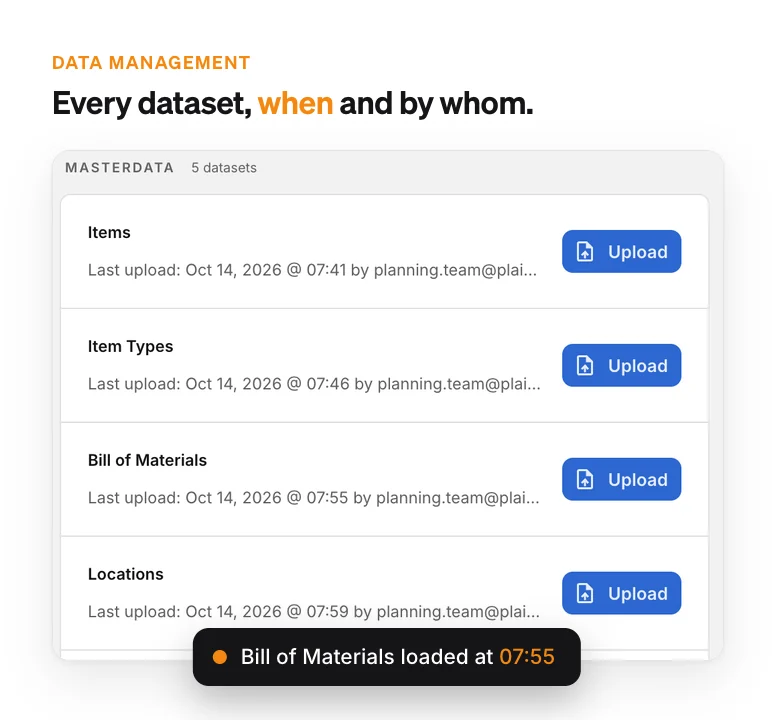
Each dataset shows when it last loaded and who loaded it. That covers items, BOMs, inventory, forecasts and supplier constraints.
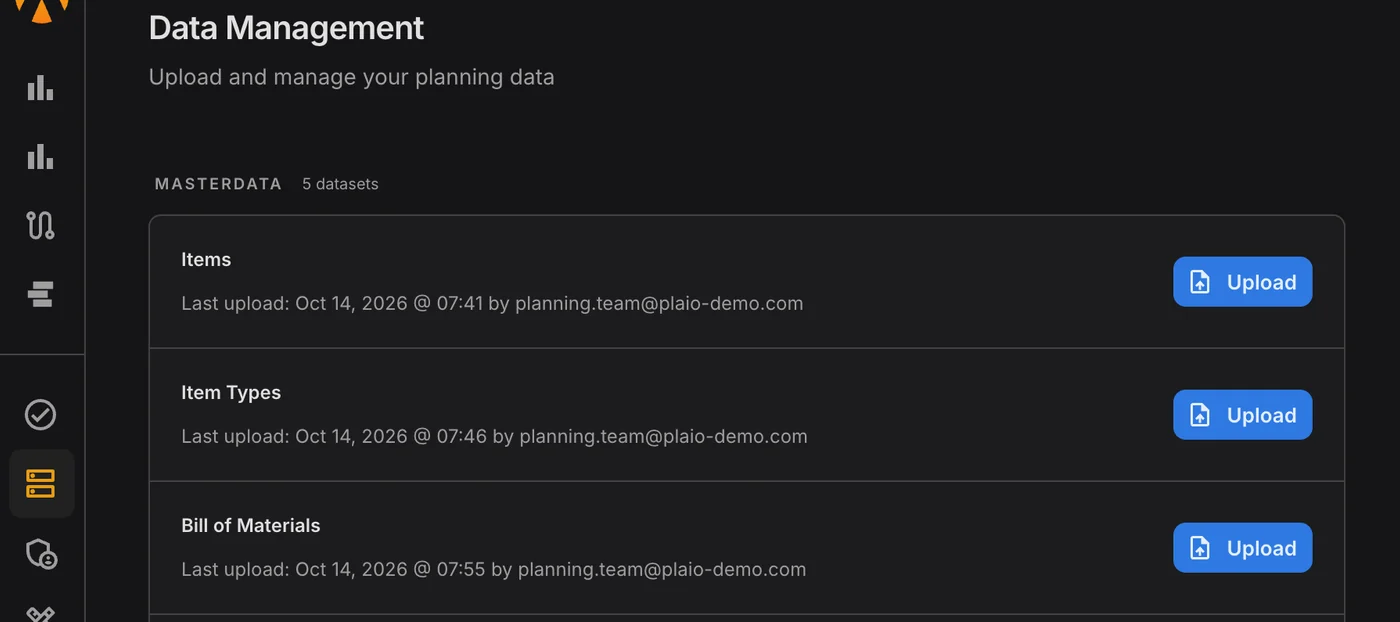
PLAIO Data Management page listing Items, Item Types and Bill of Materials, each with its last upload time and who loaded it.

Data quality without the chaos

PLAIO’s pharma data management software provides an easy-to-use hub where all your planning data is visible and trusted. With built-in health monitoring, you can stop hunting for issues and start making confident decisions based on data you can rely on.

PLAIO checks each load as it arrives and tells you in plain words what is missing.

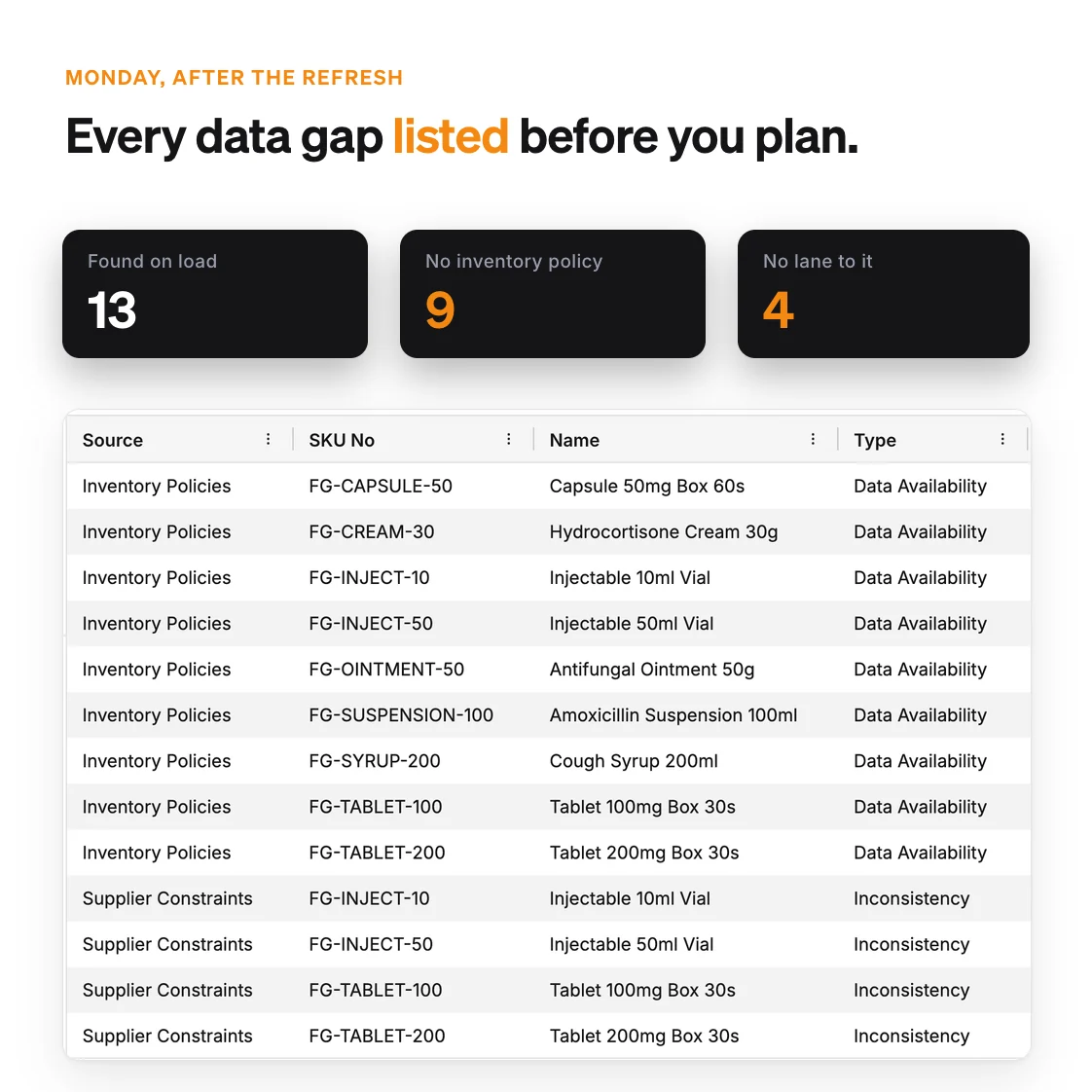
Data Exceptions lists the gaps item by item. A typical Monday might turn up a supplier constraint with no inventory policy, or demand at a warehouse that no lane supplies. It also catches committed supply with no lane to deliver it and stock movements that have no opening balance.

Every line names the problem and where it is. It also says how PLAIO handles it until someone fixes it. The weekly refresh ends with a short to-do list.

Why it matters:

Catching a gap on load takes a few minutes. Catching it after the plan has gone out means planning again.

Data Exceptions list of 13 gaps found on load, 9 items with no inventory policy and 4 with no supply lane, with the counts called out above.

Where your data work gets easier

Data Management list of masterdata datasets, each with its last upload time and the person who loaded it.

Create a Central Data Hub

See all your planning data - demand signals, inventory, BOMs, and production capabilities - in one place so your team knows where to look and can trust what they see.

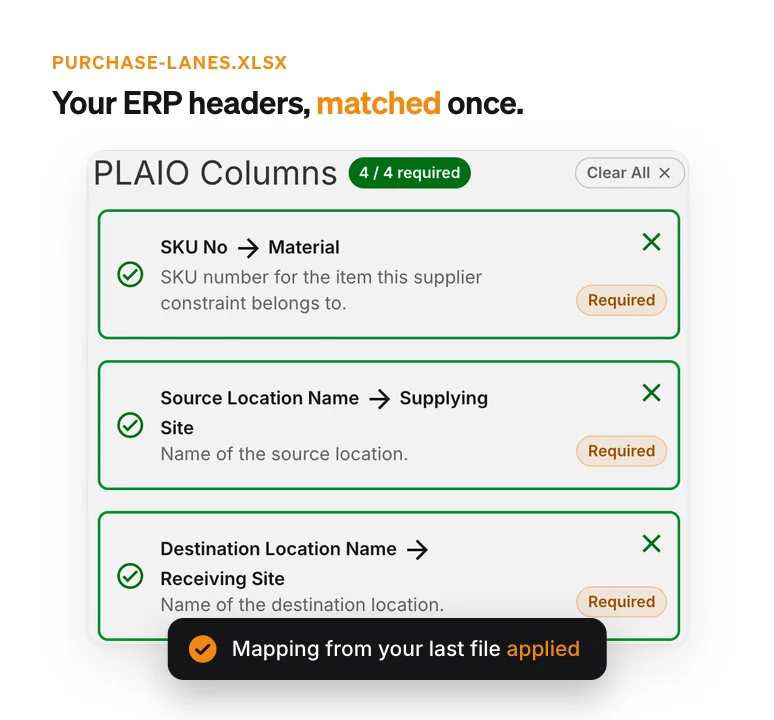
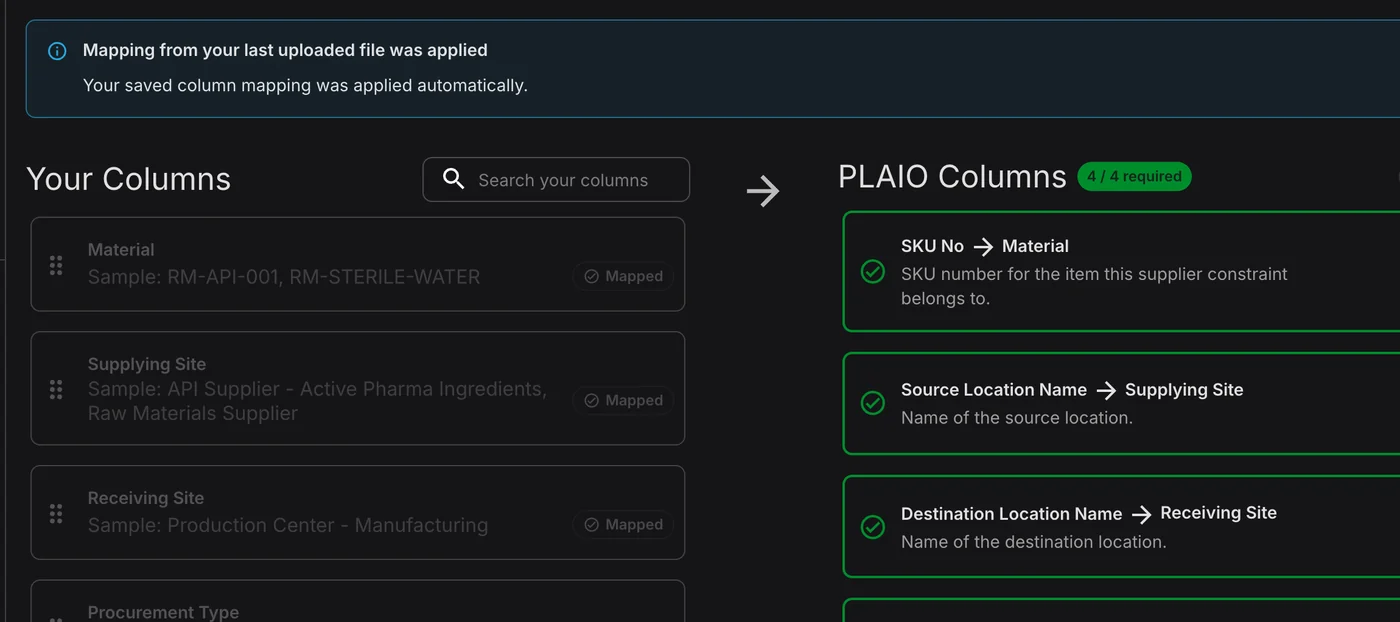
PLAIO's required columns matched to the ERP export's own headers, Material, Supplying Site and Receiving Site, with the saved mapping applied.

Reduce Manual Data Preparation

Spend less time fixing data and more time planning. Upload the export as it comes out of your ERP or spreadsheet and match its columns once; next time the same file arrives, the mapping is applied for you and validation catches issues early.

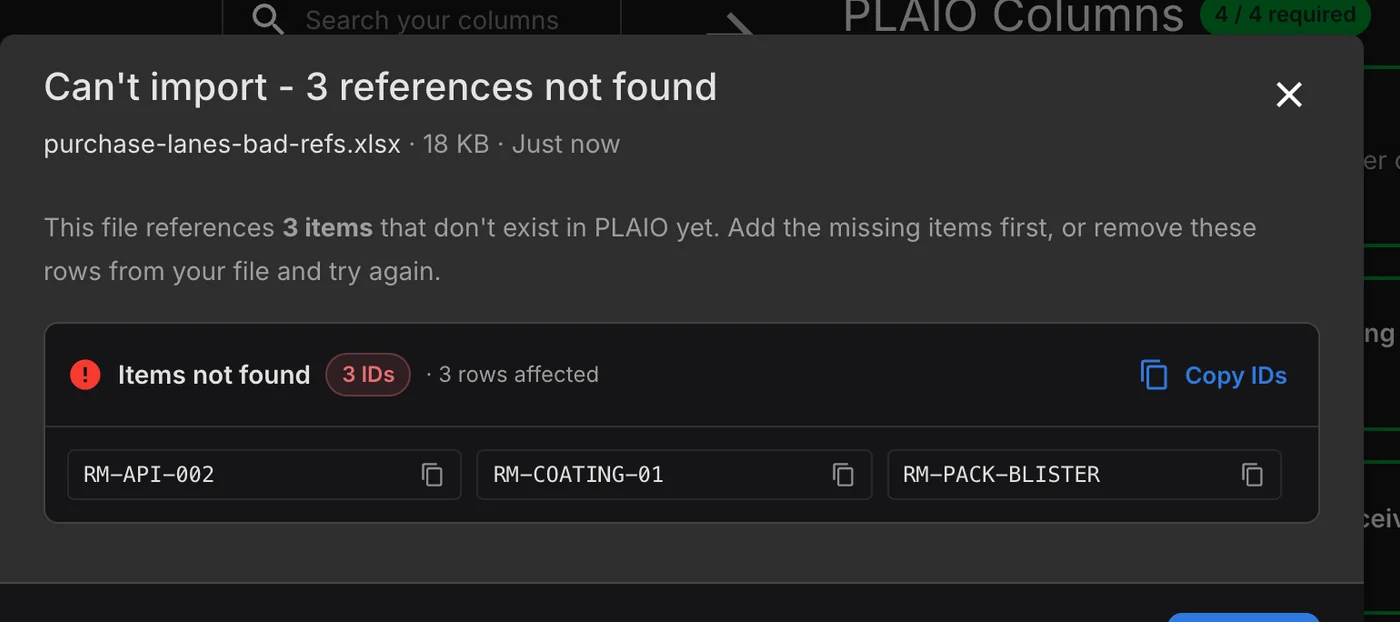
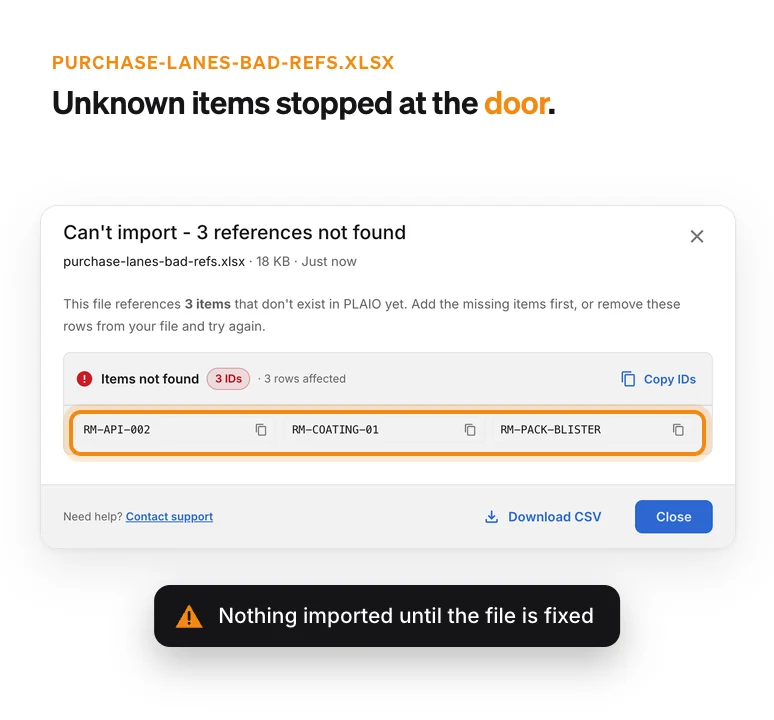
Dialog refusing a supplier file because RM-API-002, RM-COATING-01 and RM-PACK-BLISTER are not items in PLAIO.

Monitor Data Health and Get Exceptions

Missing records and inconsistent values come back as exceptions, which gives your team time to fix them before the plan runs. If a file points at an item PLAIO doesn't know, the upload stops and the missing IDs are listed.

How data management works in PLAIO

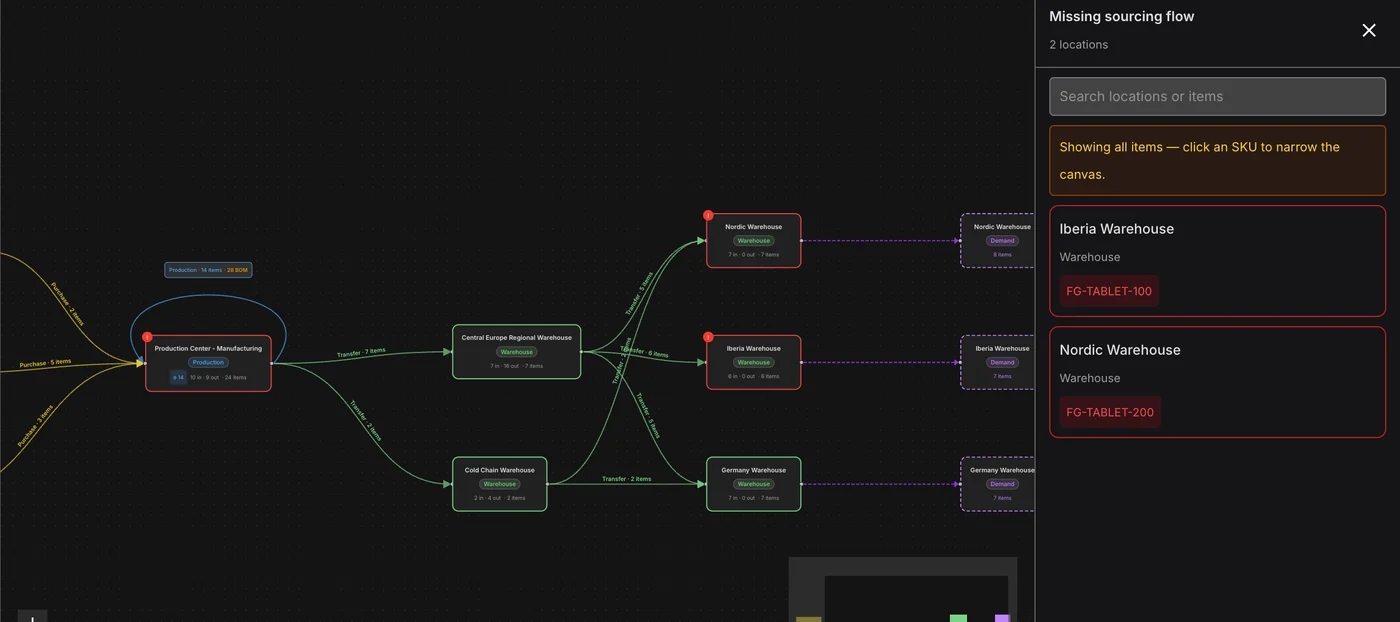
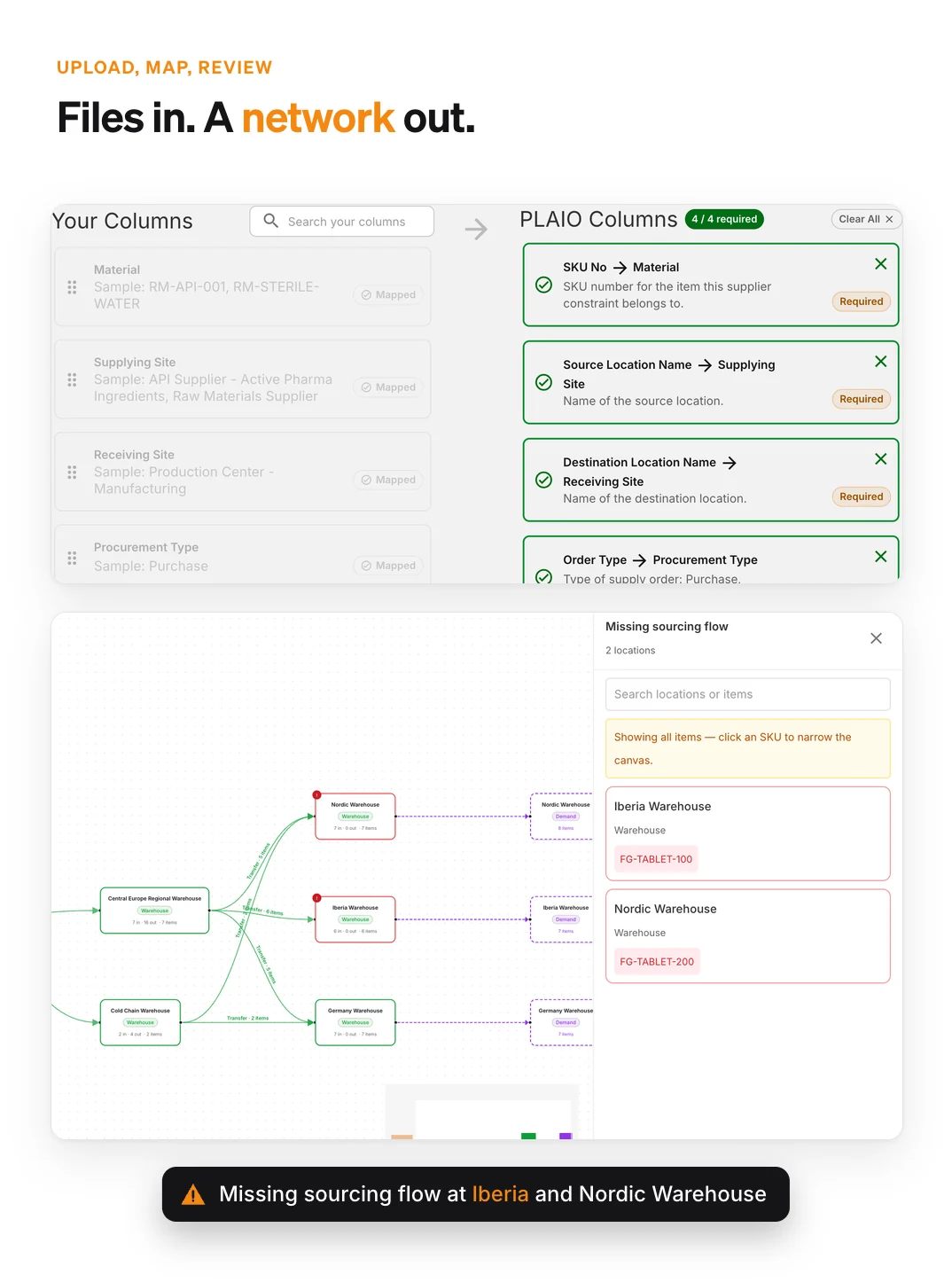
Column mapping of an uploaded supplier file above the supply network PLAIO draws from it, with Iberia and Nordic Warehouse flagged for missing inbound supply.

Demand

PLAIO standardizes sales history, forecasts, and commercial inputs in a central hub. Data health exceptions flag inconsistencies early, improving forecast accuracy and reducing manual prep time. Forecasts and sales orders can also be loaded in a pivoted layout, one column per month.

Supply

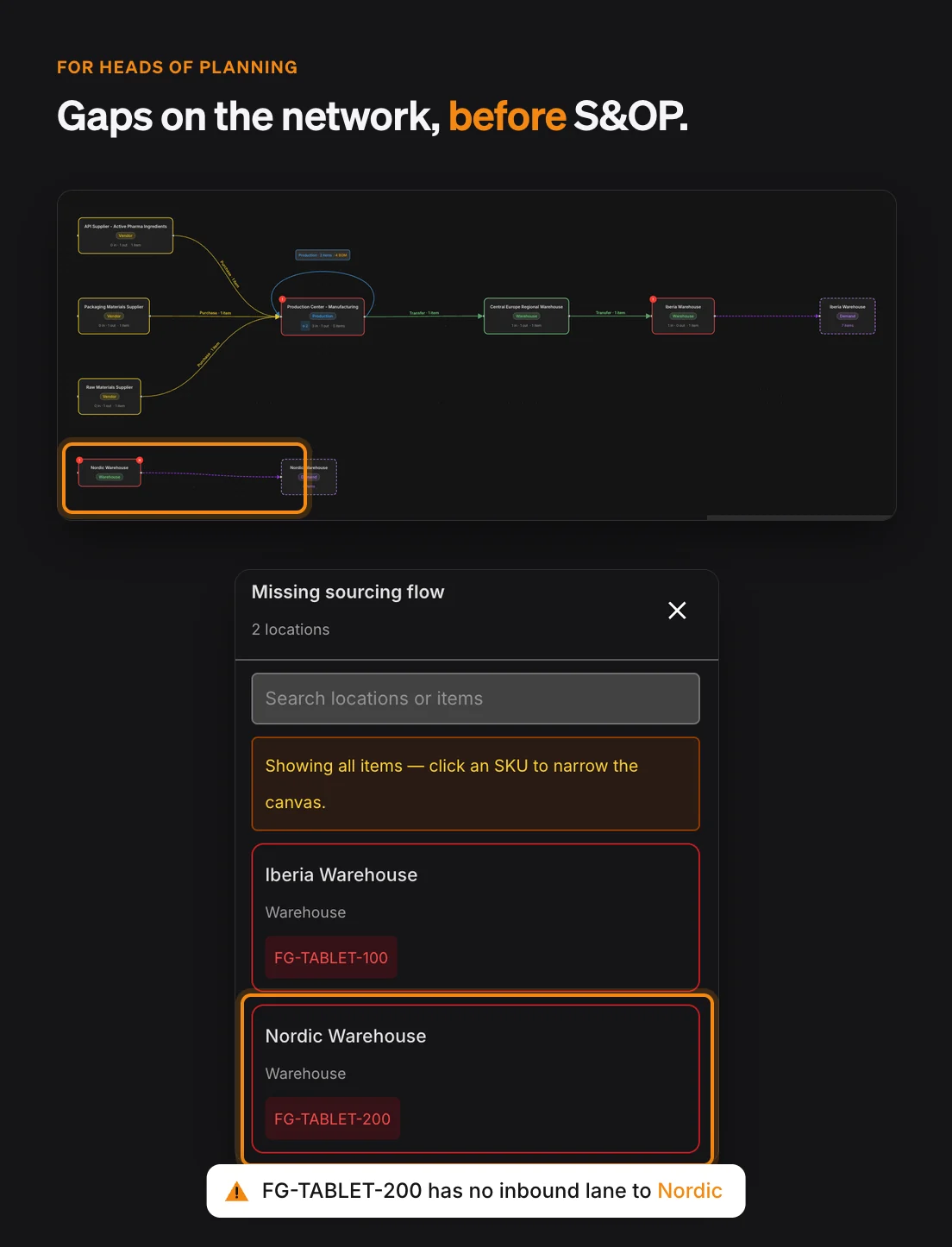
Supply planning relies on structured data for inventory, BOMs, and lead times. The data hub ensures these inputs are consistent and reliable, so every supply plan is built on a foundation of trust. The network builder draws your supply network from the lanes you loaded and flags missing supplier constraints and inventory policies.

Production

Production planning uses harmonized master data for materials and routing. Shop floors, capacity and downtime load through the same upload, map and review steps, so the data is checked and ready, and production schedules stay feasible and aligned with real-world conditions.

If you lead a planning team

Key capabilities at a glance

  • Demand, supply and production data kept in one place.
  • Data exceptions raised on every load, before anyone plans on bad data.
  • Data models built for how pharma plans demand and supply.

Why it matters:

Planners get their week back for planning. And when someone in S&OP questions a number, you can show which load it came from.

Network builder filtered to one tablet SKU, showing Nordic Warehouse cut off from supply and the Missing sourcing flow panel naming FG-TABLET-200 at Nordic Warehouse.

Data Management FAQ

We share it with you. Our team uses AI to draft each data mapping, and a consultant checks the draft. Your planners review each upload before it touches the plan. Anything still missing shows up in Data Exceptions, so gaps get closed while you plan.

Start with master data: items, item types, locations, bills of materials, customers and inventory. Demand needs forecasts, sales orders and any demand segments. Supply needs supplier constraints with lead times and order quantities, firm orders, and inventory and order policies. If you plan production, add shop floors, capacity and downtime. Each one is its own dataset in Data Management.

No. Any dataset can be uploaded as a file while the integration is being built, then moved to the Integration API later. Uploads and the API write to the same planning data, so moving a feed over leaves the plan as it is.

No. When you upload, you match each of your columns to one of PLAIO's, with a few of your own values shown beside it. PLAIO keeps that mapping and reuses it for the next file with the same headers.

PLAIO imports nothing until the file is right. If it refers to items or locations that don't exist, the upload stops and lists them, and you either add them or drop those rows. A value that doesn't fit its column gets a plain explanation and a suggested fix. Even a clean file waits for you to review the new and changed rows.

Data Exceptions looks across everything you have loaded. It finds items that have a supplier constraint but no inventory policy, and demand at a location that no supplier constraint delivers to. It also flags BOM components with no supply, committed supply with no lane to receive it, and inventory movements without an opening balance. Duplicate lanes from one source get caught too, as do lead times or safety stock that don't fit monthly planning.

Yes. For every dataset, Data Management shows when it was last uploaded and by whom. Before a planning cycle or an S&OP review, check that the forecast, inventory and supply data are from this week.

You do. Every customer has a separate database, and the data in it belongs to that customer.

Clean data. Clear decisions.

Turn fragmented pharma data into validated, planning-ready inputs that power accurate forecasts and feasible supply plans.

Book a demo

Cookie settings

To enhance your experience on our site and to analyze traffic, we use cookies. By clicking "Accept All," you agree to the storing of cookies on your device for analytics purposes. You can manage your settings or learn more in our Privacy Policy.

Manage Settings
  • Your Privacy Matters to Us

    We use cookies to improve your browsing experience and analyze how our website is used. These cookies allow us to understand trends, monitor website traffic, and gather insights to make the site better for you.

    We respect your privacy and are committed to transparent data usage.

    Why Do We Use Cookies?

    Necessary Cookies: These ensure that the website functions properly.

    Analytics Cookies: These help us track site traffic, user behavior, and performance metrics. The data collected is anonymous and allows us to continuously optimize the site.

    Preferences Cookies: We may use cookies to remember your preferences and tailor your experience.

    Marketing Cookies: We may use cookies for marketing purposes.

    Your Control, Your Choice

    By clicking "Accept All," you consent to the use of all cookies. If you prefer, you can customize your choices and opt out of certain cookies. You can learn more about how we handle data and cookies in our Privacy Policy.