

PLAIO vs Excel planning

Your plan has outgrown the spreadsheet. PLAIO is what comes next

Excel knows nothing about shelf life, CMO lead times or batch expiry, so your planner rebuilds those rules in formulas every cycle. PLAIO has them built in, plans the whole portfolio in one place and records every change.

See a few of your SKUs planned outside Excel

30 minutes with our team. Bring a few SKUs and the workbook you plan in today.

Goes straight to our team. Never shared or sold.

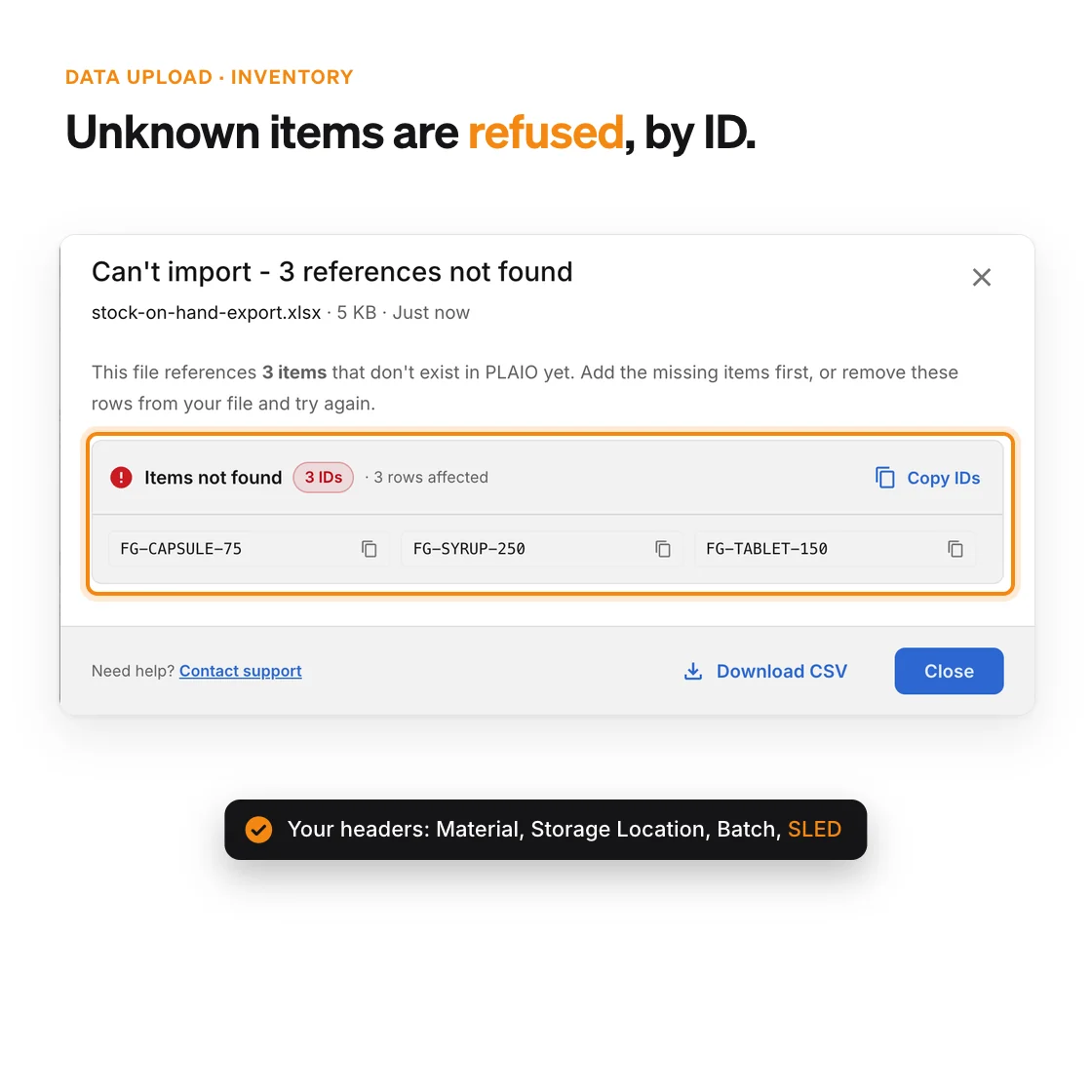
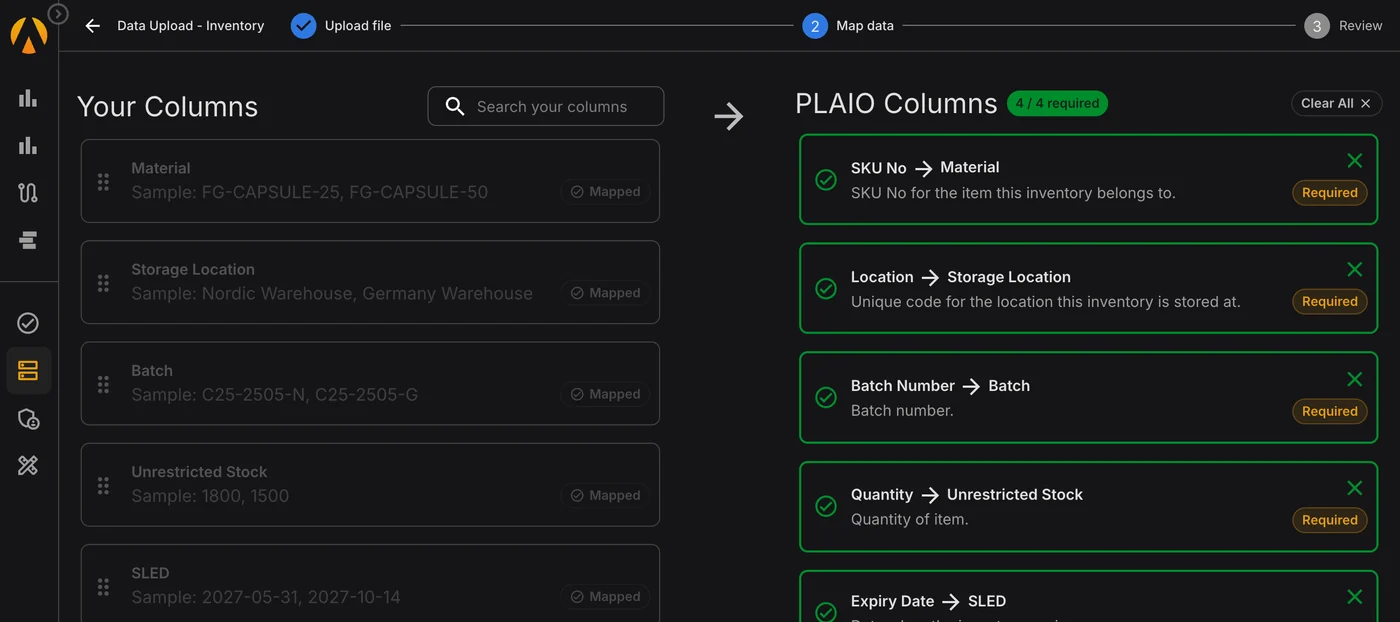
Keep your spreadsheet headers. Uploading a stock-on-hand export: the file's own headers Material, Storage Location, Batch, Unrestricted Stock and SLED mapped onto PLAIO's SKU No, Location, Batch Number, Quantity and Expiry Date.
Trusted by

Leading pharmaceutical companies

Azurity
Coripharma
MS Pharma
Navamedic
AGM Pharma
Adalvo
Frostpharma
CNX Therapeutics
Arcera
Sun Wave Pharma

PLAIO and Excel planning, side by side

Topic PLAIO Microsoft Excel
Pharma rules
Shelf life and expiry ✓Built in. Batches planned first expiry first out, with a minimum remaining shelf life per item and market16✕Not native. Excel’s what-if tools are generic9; expiry logic is formulas the planner writes and maintains
MOQs, increments and CMO lead times ✓Settings on each supply lane. Suggestions arrive already rounded and timed17✕Not native. No order-policy model9; rounding and lead-time offsets are lookup formulas on every row
Production optimisation ✓Optimizer built in, saving up to three schedule alternatives as scenarios for a planner to publish19–Solver add-in, up to 200 variable cells. The model is set up by hand10
Forecasting
Statistical forecast ✓Machine learning per item and location, beside a moving average and your commercial plan19–FORECAST.ETS exponential smoothing, one series at a time7,8. The portfolio layout is built by hand
Overlays, consensus and accuracy ✓Tender and launch overlays on one demand number, with accuracy and bias at 1–12 month lags18✕Not native. Forecast Sheet projects a single values series7; overlays and error tracking are extra formulas
Scenarios
Network-wide what-if ✓Clone the plan and compare fill rate, unfulfilled demand and lost sales before anything changes17,18–Scenario Manager takes 32 changing values; a Data Table takes two variables9. Beyond that, copy the workbook
Data and ERP
Orders back to the ERP ✓Approved suggestions carry the approver and time. The ERP collects them through the API17✕Not native. Power Query brings data in5; orders are keyed into the ERP by hand
Getting ERP data in ✓Map an export’s columns once, or use the Integration API. Files naming unknown items are refused20,21–Power Query refreshes recorded steps5. SAP HANA needs SAP’s ODBC driver on each PC6
Working together and control
Approval before orders go out ✓Nothing reaches the ERP until a planner approves it, and the approval is recorded17✕No approval step. Sheet protection “isn’t intended as a security feature”, says Microsoft11
Change history ✓Every edit with person, time, old and new value, and a comment saying why22–Show Changes covers the past 365 days, in Microsoft 365 only4. Older copies via OneDrive or SharePoint3
Several planners at once ✓Everyone works in the same plan, with comments and owned tasks on the row they concern22–Needs Microsoft 365 and OneDrive or SharePoint Online. In a conflict the last save wins2
Scale
Built for pharma planning ✓Demand, supply and production for pharma manufacturers and CMOs, in one cloud workflow15✕A general-purpose spreadsheet. Planning logic is whatever the workbook’s author builds9
Portfolio size ✓One run covers every SKU and location in the network17–1,048,576 rows per sheet. 32-bit Excel shares 2 GB of memory with its add-ins1

From Microsoft’s public documentation, checked October 2026.

Where PLAIO pulls ahead

The five places pharma planners feel the difference first.

Shelf life, batches and CMO lanes

PLAIO

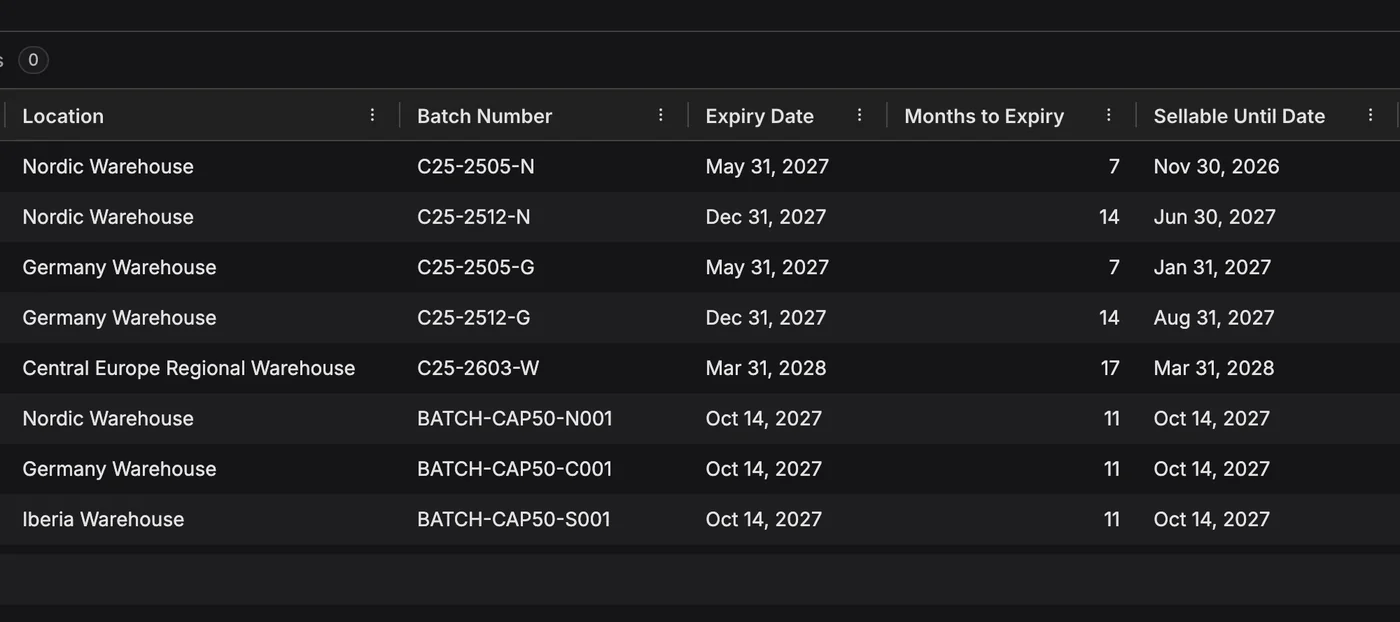
In PLAIO, shelf life and lane rules are part of the data model. Set a minimum remaining shelf life per item and location, and PLAIO works out the day each batch stops being sellable there. A batch that will be too short-dated when it’s needed stops counting toward that demand16. Each lane carries its lead time, MOQ, increment and frozen period, so a requirement of 6,748 bottles comes back as an order of 6,800, placed a month ahead17.

Microsoft Excel

Excel has a grid and functions; its what-if tools know nothing about expiry or order policies9. Every rule is a formula someone wrote, often one person, and it has to be checked again whenever rows are added or the layout shifts. A missed expiry date in that chain shows up later as a write-off.
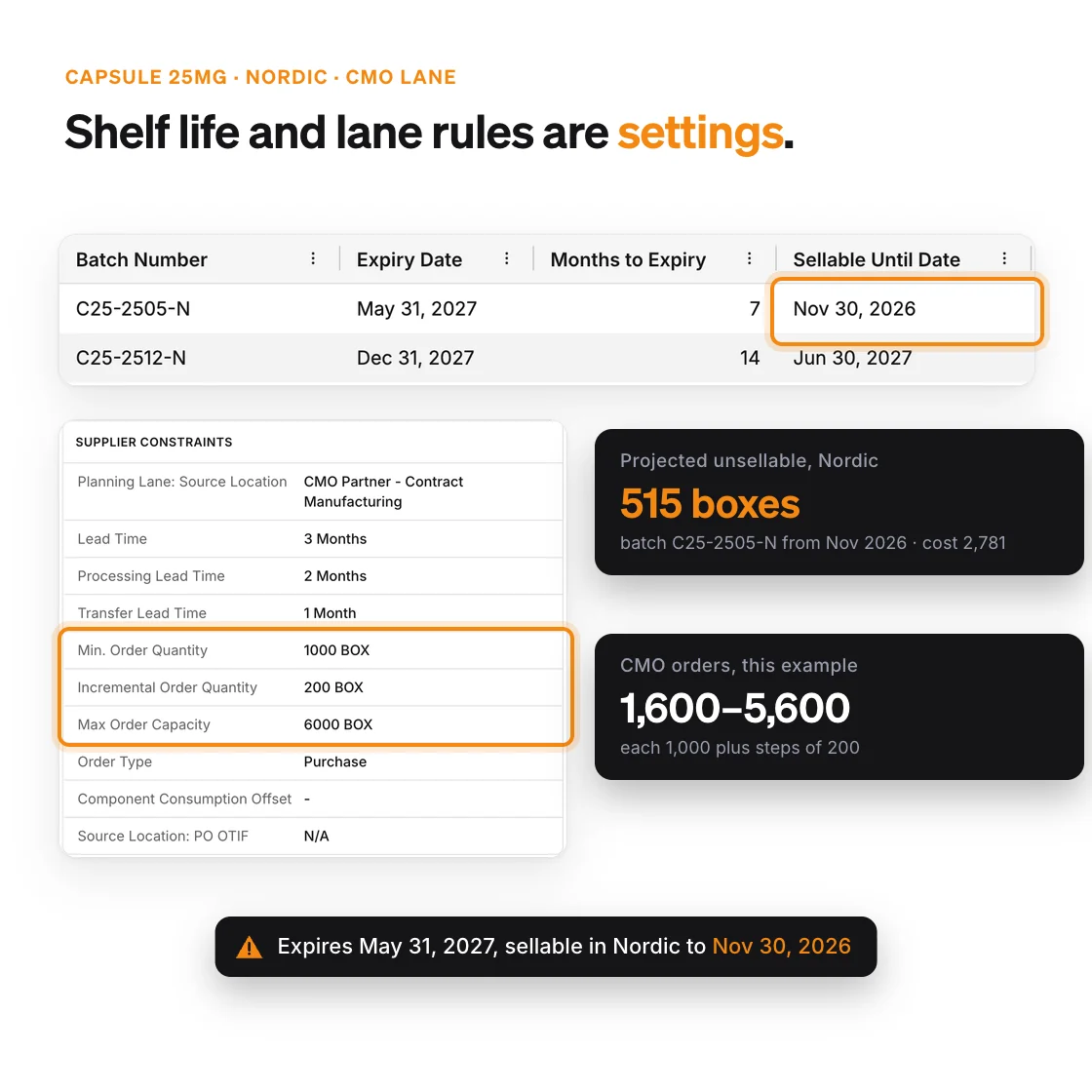
A Nordic batch of Capsule 25mg that expires May 31, 2027 but is sellable only until Nov 30, 2026, with 515 boxes projected unsellable, next to the CMO lane’s lead time, minimum order 1,000, increment 200 and maximum 6,000

Forecasting

PLAIO

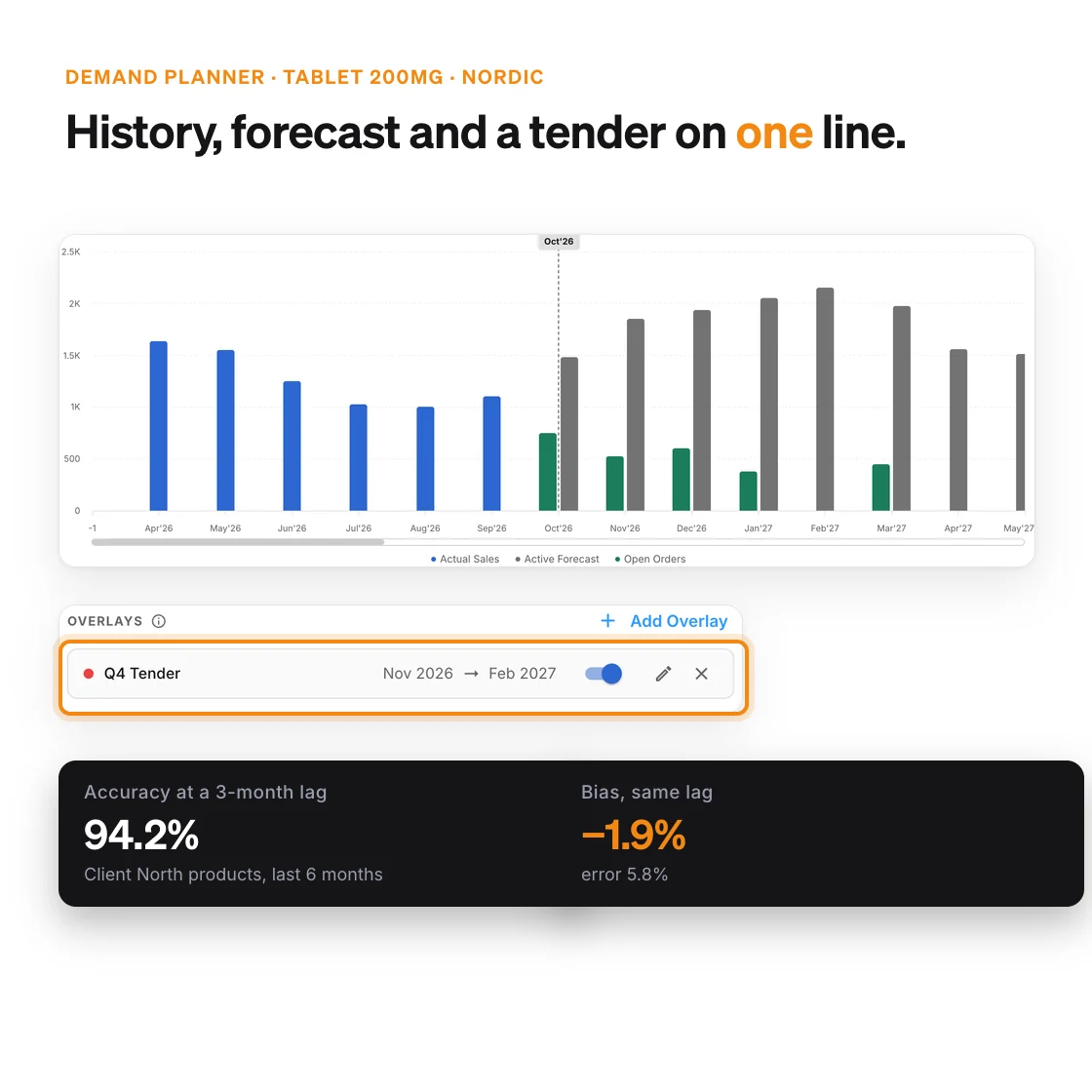
PLAIO’s ML forecast learns from monthly sales for each item and location, and picks up seasonality and trend. It sits next to a moving average and your commercial plan, and you choose the base for each part of the horizon19. Tenders and launches are overlays that touch only their months, and accuracy and bias are measured at lags from 1 to 12 months18.

Microsoft Excel

Excel’s FORECAST.ETS and Forecast Sheet use AAA exponential smoothing on one series, and the timeline needs a constant step7,8. Fine for a single product. For a portfolio, the planner builds the per-SKU layout, joins in the commercial and tender numbers, and writes any accuracy tracking from scratch, every cycle.

Demand chart for Tablet 200mg in the Nordic warehouse with monthly actual sales from Apr to Sep 2026, the forecast and booked open orders from Oct 2026, a Q4 Tender overlay on Nov 2026 to Feb 2027, and accuracy and bias at a 3-month lag

Scenarios and optimisation

PLAIO

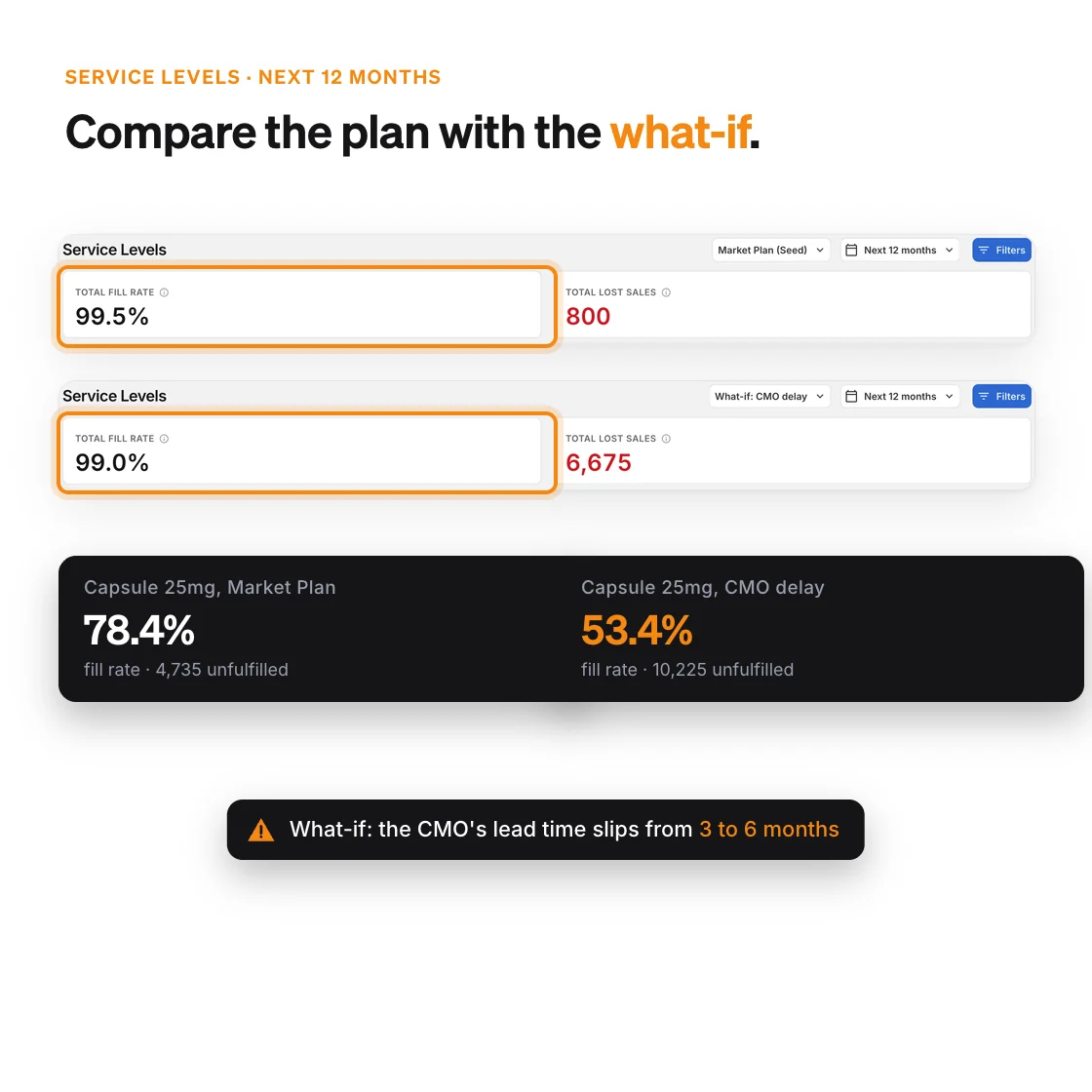
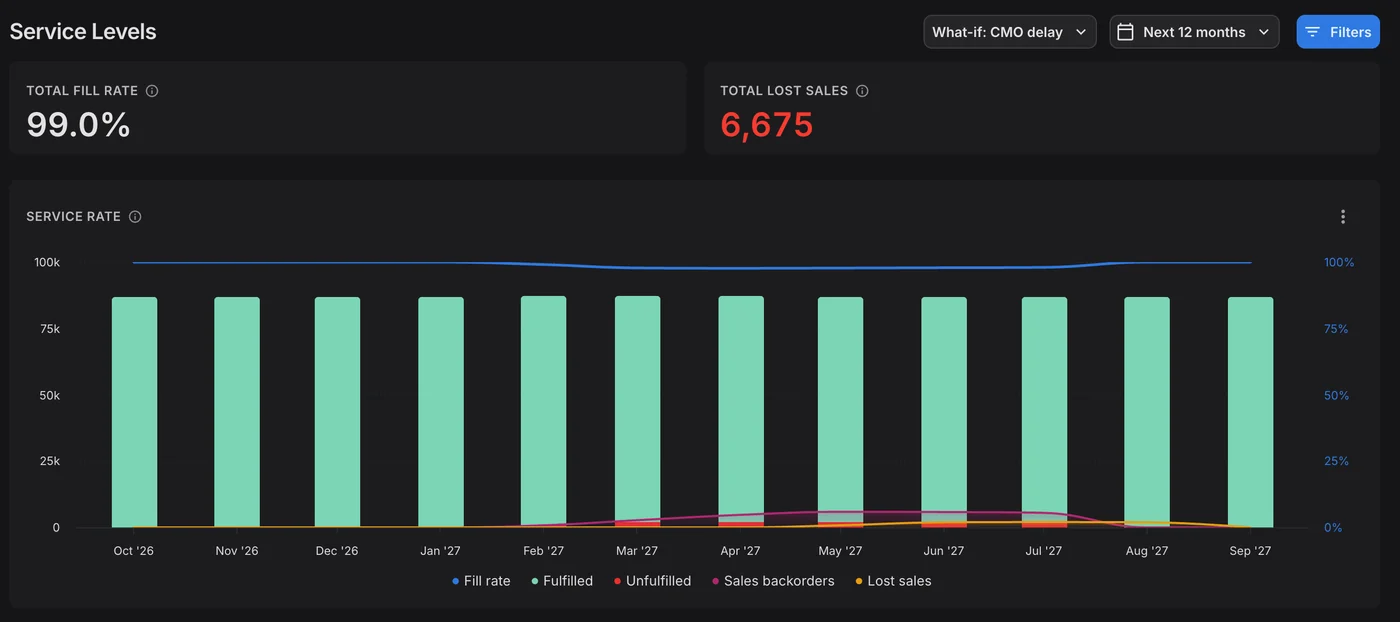
Clone the active plan into a scenario, change what worries you (a lost tender, a slipped CMO batch) and compare fill rate, unfulfilled demand and lost sales. The active plan stays put until the team makes the scenario the plan17,18. In production, the optimizer saves up to three schedule alternatives and runs with a fixed seed, so the same inputs give the same answer19.

Microsoft Excel

Scenario Manager holds up to 32 values per scenario, and a Data Table takes one or two variables9. Solver handles up to 200 variable cells, once someone has modelled the problem10. A what-if across the whole network usually means copying the workbook, editing the copy and comparing the two by eye.

Service levels for the active Market Plan (99.5% fill rate, 800 lost sales) and a what-if copy where the CMO’s lead time on Capsule 25mg slips from 3 to 6 months (99.0% fill rate, 6,675 lost sales), with the capsule’s own fill rate falling from 78.4% to 53.4%

Change history, audits and GxP

PLAIO

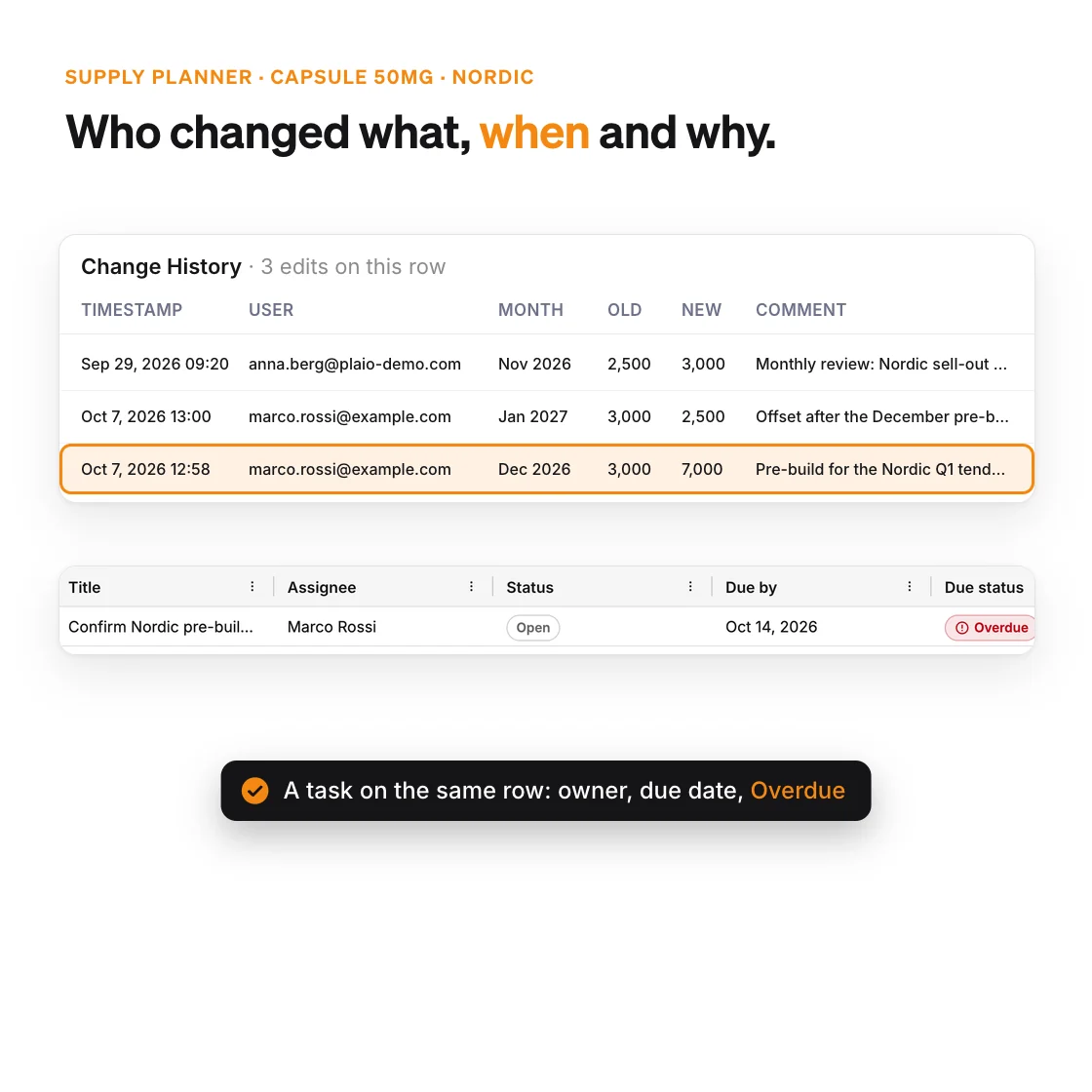
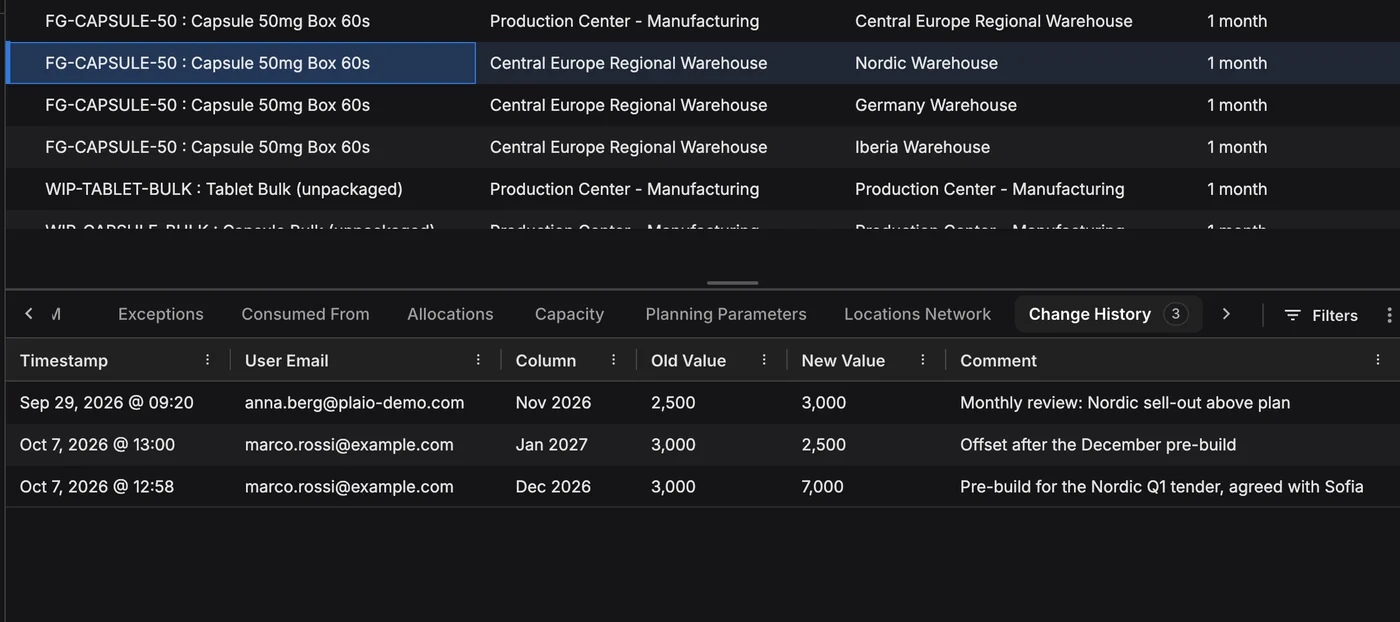
Every worksheet row in PLAIO has a Change History tab with the time, the user, the column, the before and after values and a comment on why22. Approved supply suggestions carry the approver’s name and a timestamp before the ERP collects them17. Each customer has a separate database, and PLAIO shows when each dataset was last loaded and by whom20.

Microsoft Excel

Show Changes lists who edited a cell, when and the previous value, for the past 365 days and only in Microsoft 3654; older states mean restoring a copy from OneDrive or SharePoint3. Whether a planning file is a regulated record is your QA team’s call: FDA reads Part 11 narrowly13, Annex 11 asks for audit trails “based on a risk assessment”14, and Part 11 audit trails must be secure and computer-generated12.

The Change History tab of a Supply Planner row listing three edits with timestamp, user, month, old and new value and comment, and the row’s task with its assignee, open status, due date and an Overdue flag

Getting data from the ERP

PLAIO

Upload the export as it comes out of the ERP and match its columns once; the next file with the same layout reuses the mapping. A file that names items PLAIO doesn’t know is refused, with the missing IDs listed20. When IT is ready, our team builds the ERP connection and the same data arrives through the Integration API, and approved orders go back the same way21,17.

Microsoft Excel

Power Query is Excel’s best planning feature: it connects to files, databases and the web and replays its recorded steps on refresh5. For SAP HANA it needs SAP’s ODBC driver installed on each PC6. It only brings data in, though. Orders still get typed into the ERP by hand.

Uploading a stock-on-hand export with its own headers: PLAIO refuses the file because three item IDs, FG-CAPSULE-75, FG-SYRUP-250 and FG-TABLET-150, don’t exist yet, and lists them

Why teams move off the spreadsheet

Why pharma teams choose PLAIO over Excel

  • Shelf life per market, batch expiry and CMO lead times are built in, not rebuilt in formulas each cycle16,17
  • Several planners and sites work in one plan instead of passing copies of a file around
  • Every planning change carries who, when and why, with no old copies to dig through22
  • What-if scenarios cover the whole network, not 32 cells at a time9,18
  • Approved orders flow back to the ERP with the approver recorded17

Excel is still enough if…

  • One planner holds every SKU and rule in one workbook, and nobody else needs to touch it
  • No shelf-life, CMO or multi-site constraint decides whether your plan can be executed
  • Single-series forecasts from Forecast Sheet are accurate enough for your products7

PLAIO vs Excel planning FAQ

No. Upload the file you have and drag your column names onto PLAIO’s. Extra columns can stay in the file, and only a few are required. Gaps PLAIO finds on load show up in Data Exceptions, so they get fixed while you plan rather than before you start.

Yes. The same export can be uploaded each week and PLAIO reuses the column mapping, and ad-hoc analysis can stay in Excel. What moves is the plan itself: planners override numbers where their judgement says so, test ideas in a scenario first, and every change is recorded.

No. Any dataset can be uploaded as a file while the integration is built, then moved to the Integration API. Uploads and the API write to the same planning data, so the switch leaves the plan as it is. Our customers run SAP (ECC and S/4HANA), NetSuite and Microsoft Dynamics 365 Business Central, and PLAIO also works with Oracle.

Each customer has a separate database, and the data belongs to that customer. Every edit to the plan is kept with the person, the time and the old and new values, which is more than a shared workbook gives your QA team. Your ERP stays as it was validated, because PLAIO only suggests orders and a planner approves them before they go back.

Most teams are planning in PLAIO within weeks. We start with one module and one planning scope, usually the workbook that hurts most, then widen it once that plan runs.

We ask how your plan comes together today: which files feed it, who maintains them, and which markets and CMOs it covers. Then we show a few SKUs like yours planned in PLAIO, from the upload to the supply orders. Book a time.

Microsoft, Excel, Microsoft 365, OneDrive, SharePoint and Power Query are trademarks of the Microsoft group of companies. SAP and SAP HANA are trademarks of SAP SE. PLAIO is not affiliated with or endorsed by Microsoft or SAP.

Bring the workbook. Leave with a plan

30 minutes on a few of your own SKUs, starting from the spreadsheet you plan in today.

Book my 30-minute demo Prefer to read first? Why supply chain planning in Excel limits pharma growth

Cookie settings

To enhance your experience on our site and to analyze traffic, we use cookies. By clicking "Accept All," you agree to the storing of cookies on your device for analytics purposes. You can manage your settings or learn more in our Privacy Policy.

Manage Settings
  • Your Privacy Matters to Us

    We use cookies to improve your browsing experience and analyze how our website is used. These cookies allow us to understand trends, monitor website traffic, and gather insights to make the site better for you.

    We respect your privacy and are committed to transparent data usage.

    Why Do We Use Cookies?

    Necessary Cookies: These ensure that the website functions properly.

    Analytics Cookies: These help us track site traffic, user behavior, and performance metrics. The data collected is anonymous and allows us to continuously optimize the site.

    Preferences Cookies: We may use cookies to remember your preferences and tailor your experience.

    Marketing Cookies: We may use cookies for marketing purposes.

    Your Control, Your Choice

    By clicking "Accept All," you consent to the use of all cookies. If you prefer, you can customize your choices and opt out of certain cookies. You can learn more about how we handle data and cookies in our Privacy Policy.