Planning on NetSuite, with Sikich

Keep NetSuite. Retire the spreadsheet

NetSuite runs your orders and stock. Shelf life by market, CMO lead times and MOQs end up in one planner’s spreadsheet. PLAIO plans them on NetSuite’s own data, and the orders your planners approve go back to it.

See a few of your SKUs planned on NetSuite

30 minutes with Sikich and PLAIO. Bring a few SKUs and the spreadsheet you plan in today.
Goes straight to our team. Never shared or sold.

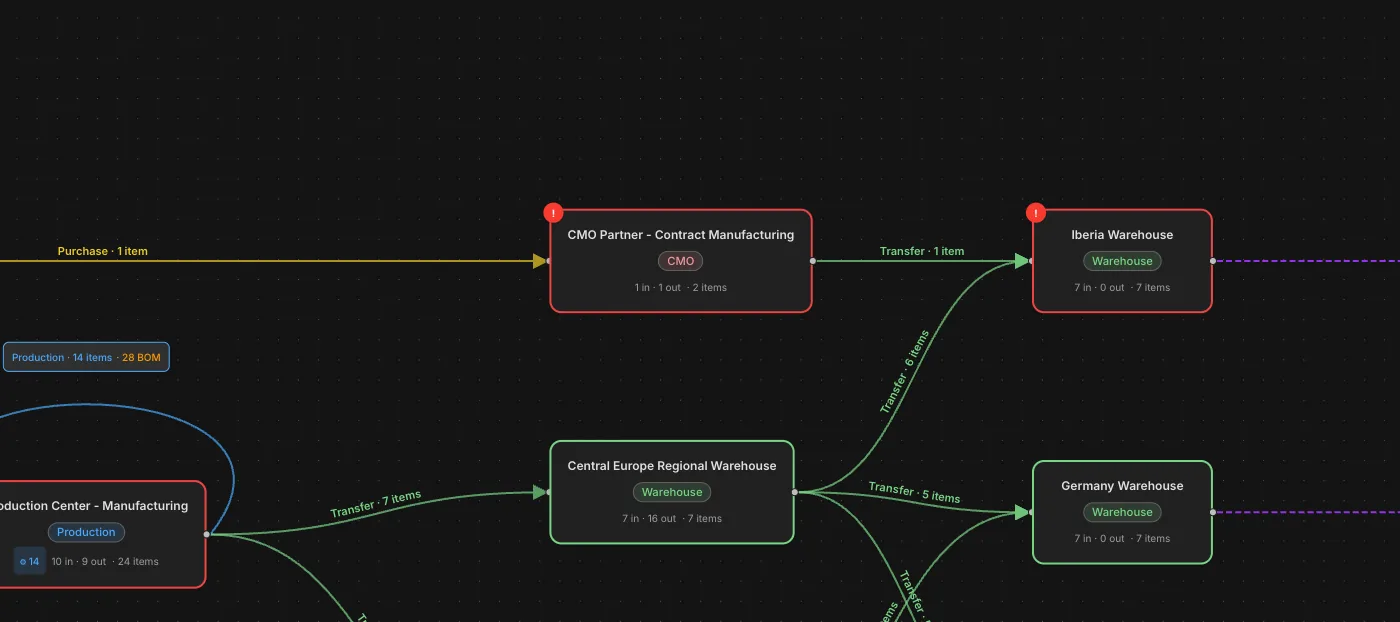
Every CMO and lane in one model. The CMO Partner in PLAIO's network builder, between the API supplier and the Iberia and Germany warehouses.
Trusted by

Leading pharmaceutical companies

Azurity
Coripharma
MS Pharma
Navamedic
AGM Pharma
Adalvo
Frostpharma
CNX Therapeutics
Arcera
Sun Wave Pharma

When the plan lives in a spreadsheet, the risk lives everywhere else

By industry estimates, contract manufacturers now handle 50% to 60% of pharmaceutical manufacturing volume worldwide. Their lead times, minimum orders and shelf-life rules too often live in emails, PDFs and one planner’s workbook, outside NetSuite.

NetSuite knows what happened. The plan is rebuilt by hand, by one person, every cycle.

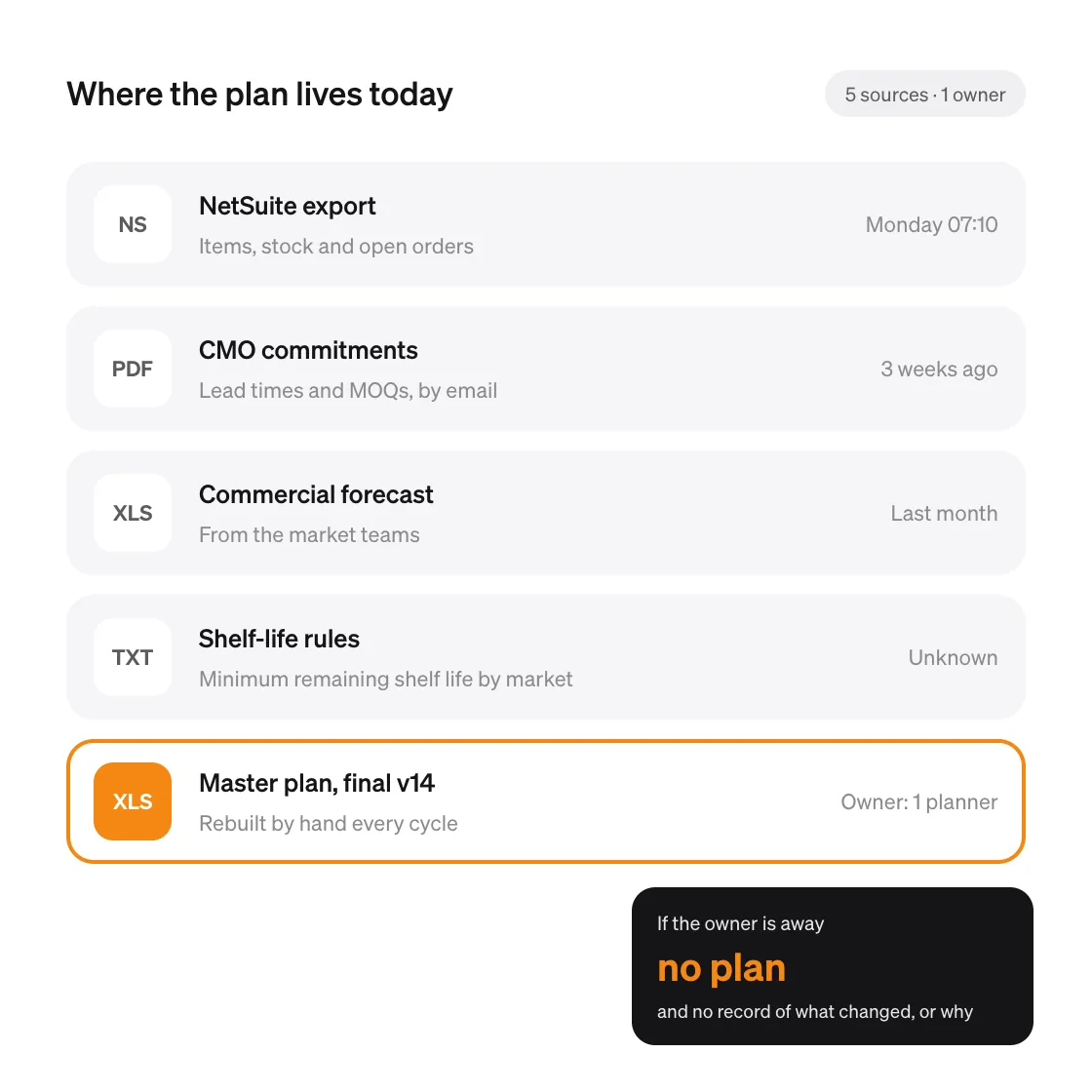
The export comes out of NetSuite on Monday. The CMO’s commitments arrive as a PDF, the commercial forecast as another workbook, and the shelf-life rules live in someone’s head. One planner stitches them together, and the plan is only as current as their last rebuild.

When a supplier slips, there is no quick way to see what it does to stock and service. And when someone asks who changed an assumption, and why, there is no record to show.

Why it matters:

NetSuite is not the problem. The gap between NetSuite and the plan is, and it is an architectural gap rather than a staffing one. A planning layer closes it without touching the ERP you have already validated.

Where the plan lives today: a NetSuite export, CMO commitments by email, a commercial forecast workbook, shelf-life rules nobody has written down, and a master plan rebuilt by hand by one planner.

What you can do with PLAIO on NetSuite

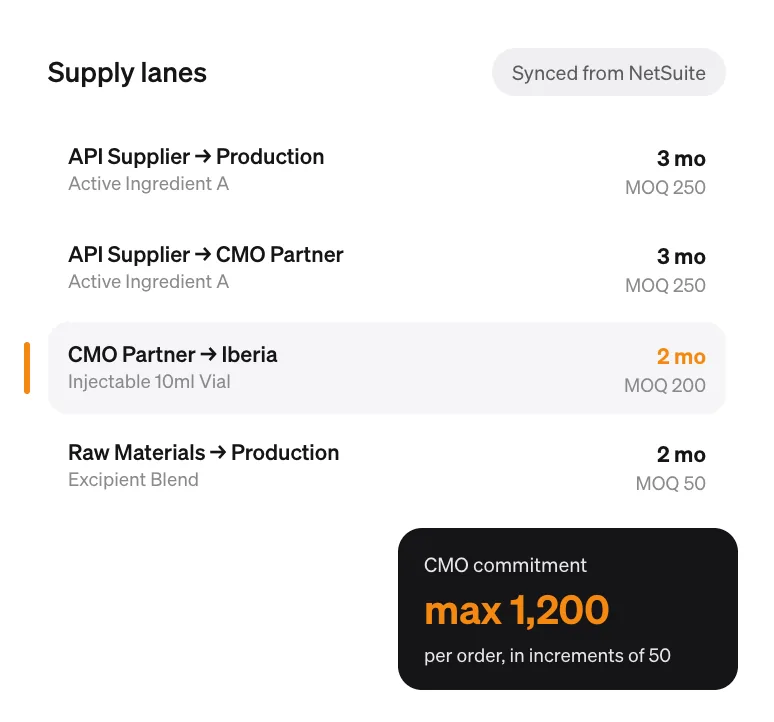
Supply lanes synced from NetSuite, each with its lead time and minimum order quantity. The CMO Partner to Iberia lane is highlighted: 2 months, MOQ 200, up to 1,200 per order in increments of 50.

Connect your commitments

Forecasts, CMO commitments and raw-material lead times sit in one live model instead of five files, so everyone plans from the same numbers.

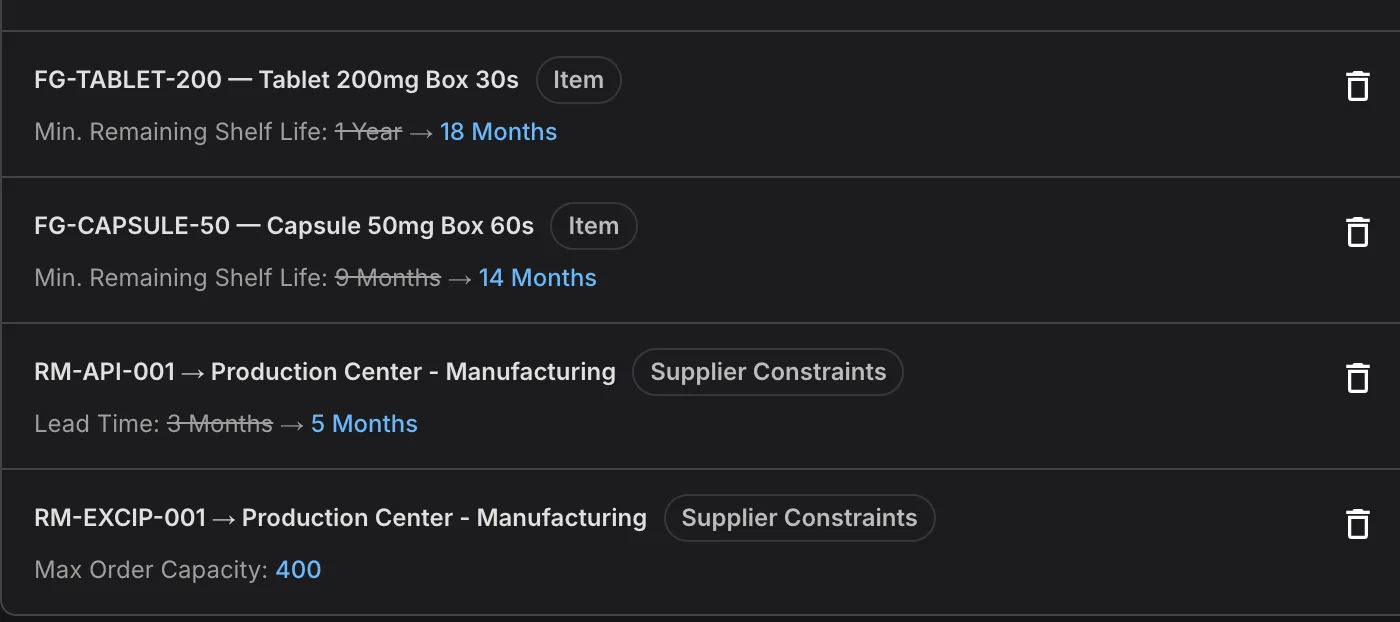
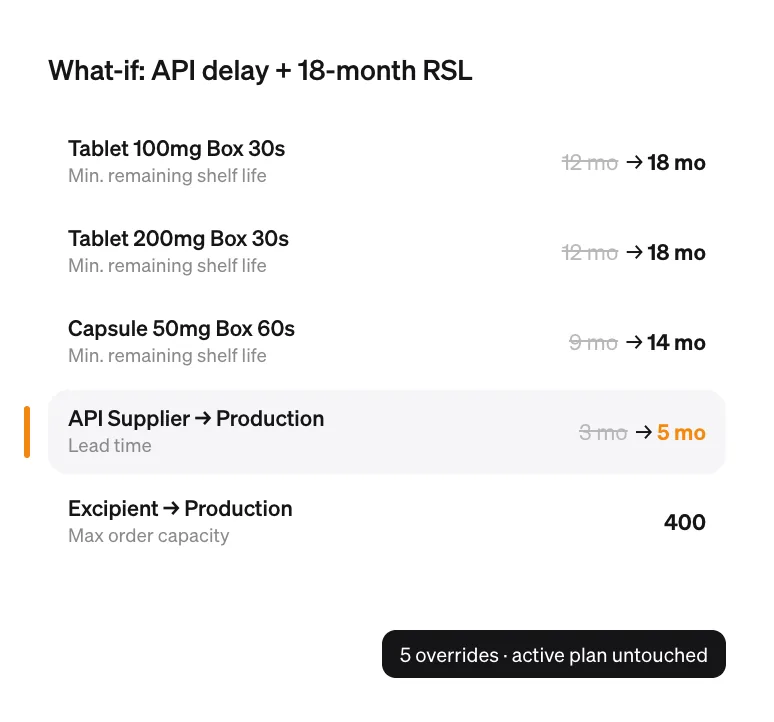
A what-if scenario raising minimum remaining shelf life from 12 to 18 months on two tablets and from 9 to 14 months on a capsule, extending the API supplier lead time from 3 to 5 months, and capping excipient orders at 400.

Model real-world constraints

Remaining shelf life by market, minimum order quantities, batch increments and supplier capacity are part of the plan calculation, not notes beside it.

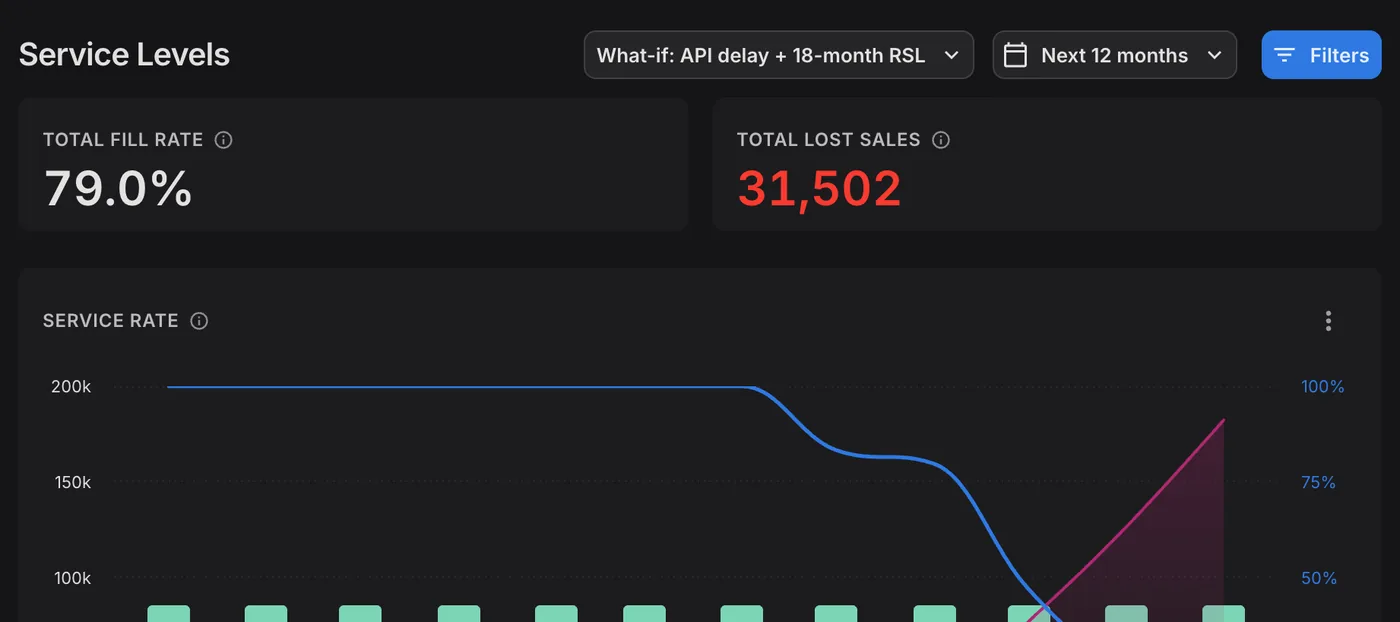
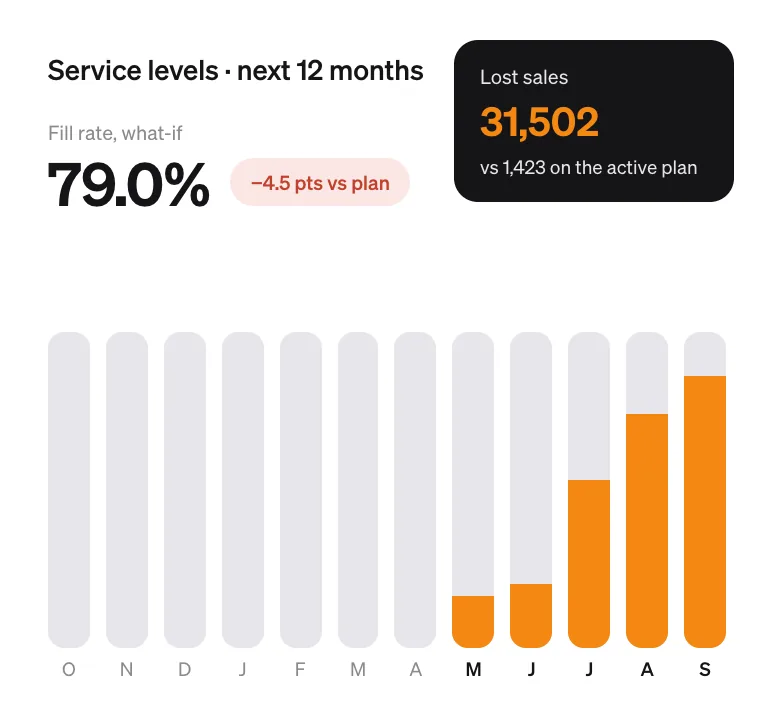
Service levels under the what-if scenario: a 79.0% fill rate, 4.5 points below the active plan, and 31,502 lost sales against 1,423, with shortfalls growing from May.

Test what-if scenarios in minutes

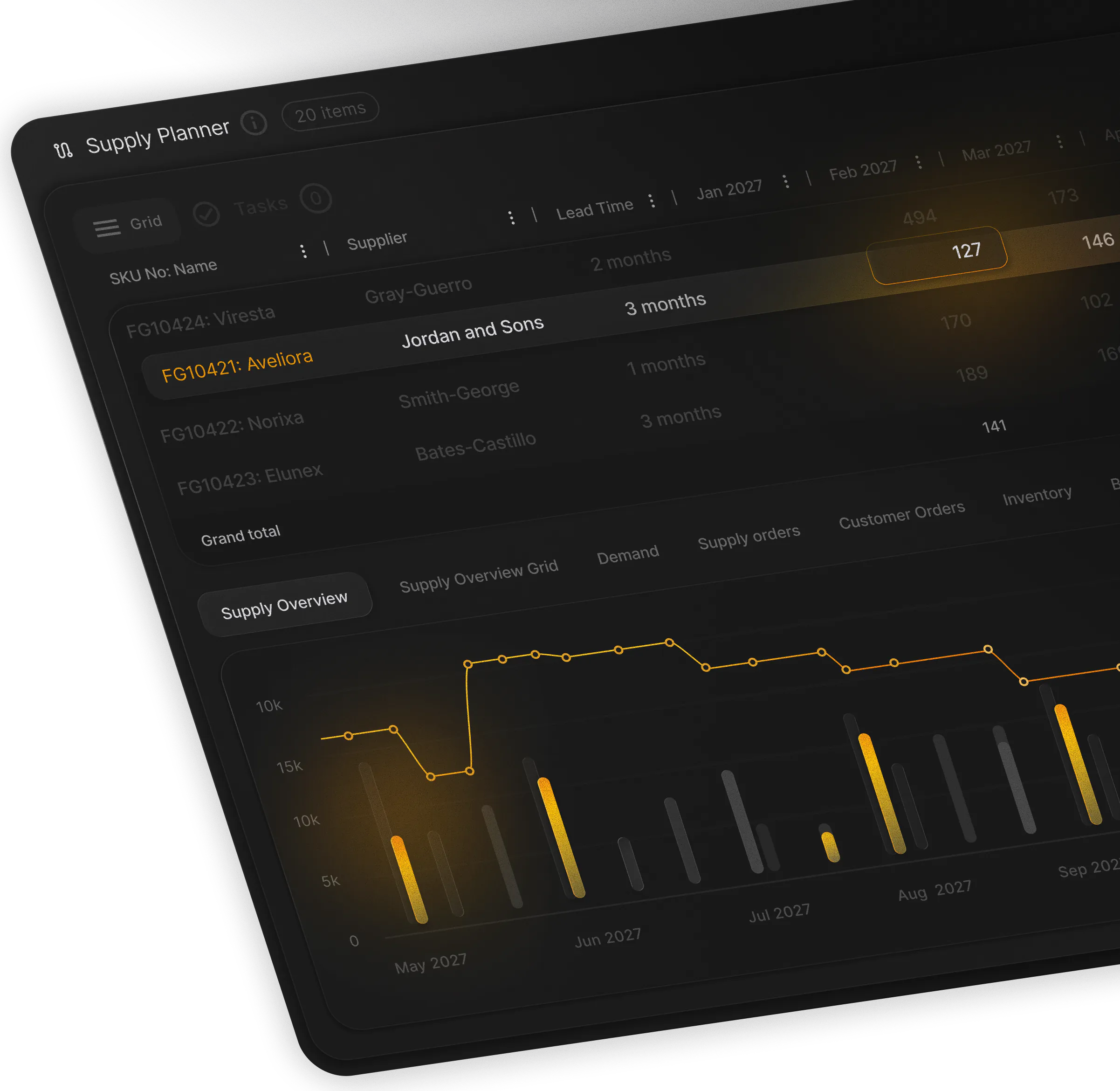
Delay a supplier, cap a capacity or tighten a shelf-life rule in a scenario, and see the effect on inventory and fill rate before it happens.

How PLAIO works with NetSuite

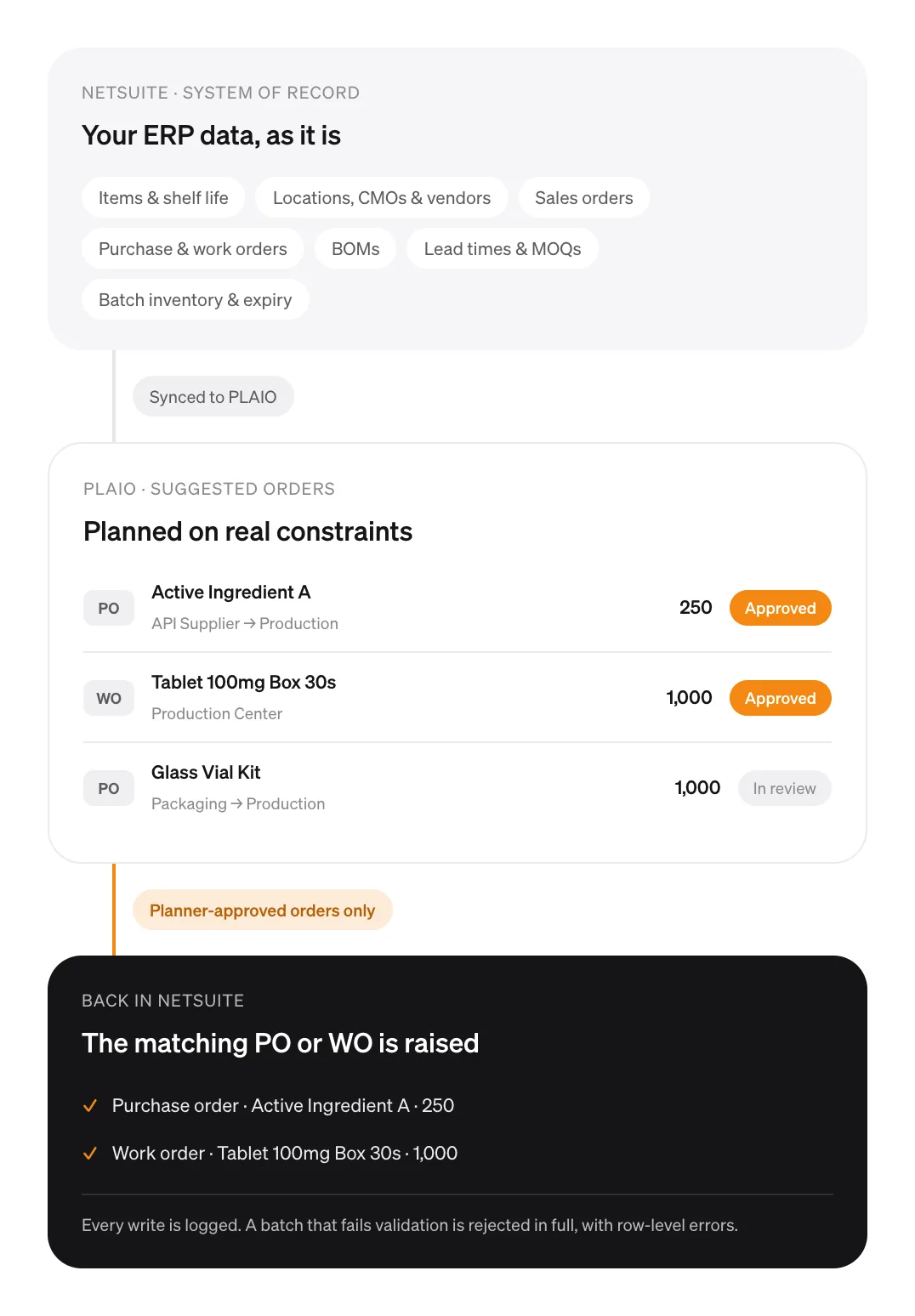
NetSuite stays the system of record and syncs items, locations, orders, BOMs, lead times and batch inventory to PLAIO. PLAIO suggests orders, a planner approves them, and only approved orders go back to NetSuite as a purchase order or work order. Every write is logged.

NetSuite stays the system of record

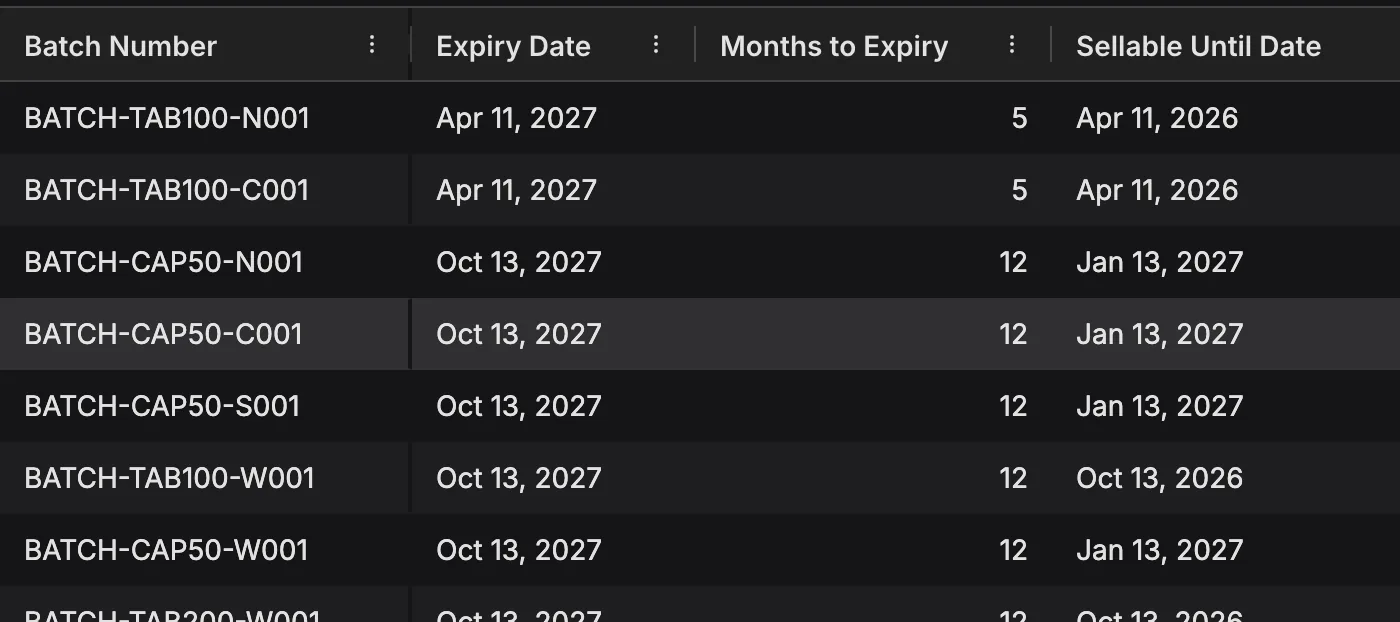
Orders, inventory and financials stay in NetSuite. PLAIO plans on its items and shelf-life rules, locations including your CMOs, sales orders, open purchase and work orders, BOMs, lane lead times and MOQs, and batch-level stock.

Start before the connection is built

Plan on the NetSuite exports and spreadsheets you already have. When the connection is ready, each dataset switches to the live feed and the plan carries on.

Planners approve every order

A suggested order reaches NetSuite only after a planner has signed it off, and NetSuite creates the purchase or work order in its own process. Every write is logged, and a batch that fails validation is rejected in full.

Sikich connects the two

Sikich brings life sciences consulting, NetSuite implementation and GxP validation support. The team that implemented your ERP is the team that plugs planning into it.

Planning on NetSuite FAQ

No. NetSuite remains the system of record for orders, inventory and financials. PLAIO is a planning layer on top of it, which avoids a multi-year ERP replacement.

Yes. Start on the NetSuite exports and spreadsheets you already have: every dataset can be uploaded from a spreadsheet, and your planners map their columns once. When the connection is ready, each dataset moves to the live feed, and the plan carries on rather than being rebuilt.

Items, including shelf life and minimum remaining shelf life; locations, including your CMOs and vendors; customers and sales orders; open purchase orders and work orders, with confirmed and actual dates for OTIF tracking; bills of materials, including substitute components; lead times, minimum order quantities and order increments on each supply lane; and on-hand inventory by batch, with lot numbers and expiry dates.

Only after a planner has signed them off. Approved orders are published for NetSuite to pick up, and NetSuite creates each purchase or work order in its own process. Sikich builds and supports that connection. Every write is logged, and a batch that fails validation is rejected in full with row-level errors.

Your ERP stays exactly as it was validated; the planning layer is what gets qualified. That keeps validation to a scoped exercise rather than a revalidation of NetSuite, and Sikich provides GxP validation support. PLAIO’s integration contract is versioned by date and pinned per customer, so a PLAIO release does not silently change the interface your connection was validated against.

A conversation with Sikich and PLAIO about how you plan on NetSuite today: where the plan lives, which CMOs and constraints it has to cover, and a few of your SKUs as they would look in PLAIO. Book a time.

NetSuite is a trademark of Oracle and/or its affiliates. PLAIO is not affiliated with or endorsed by Oracle.

Bring a few SKUs. See them planned on NetSuite

30 minutes with Sikich and PLAIO, on your own products, your CMOs and the spreadsheet you plan in today.
Test it on a few SKUs Prefer to read first? When the plan lives in a spreadsheet, the risk lives everywhere else
Cookie settings

To enhance your experience on our site and to analyze traffic, we use cookies. By clicking "Accept All," you agree to the storing of cookies on your device for analytics purposes. You can manage your settings or learn more in our Privacy Policy.

Manage Settings
  • Your Privacy Matters to Us

    We use cookies to improve your browsing experience and analyze how our website is used. These cookies allow us to understand trends, monitor website traffic, and gather insights to make the site better for you.

    We respect your privacy and are committed to transparent data usage.

    Why Do We Use Cookies?

    Necessary Cookies: These ensure that the website functions properly.

    Analytics Cookies: These help us track site traffic, user behavior, and performance metrics. The data collected is anonymous and allows us to continuously optimize the site.

    Preferences Cookies: We may use cookies to remember your preferences and tailor your experience.

    Marketing Cookies: We may use cookies for marketing purposes.

    Your Control, Your Choice

    By clicking "Accept All," you consent to the use of all cookies. If you prefer, you can customize your choices and opt out of certain cookies. You can learn more about how we handle data and cookies in our Privacy Policy.