For contract manufacturers

CMO planning software for shared lines and moving orders

When clients share your lines, one moved date changes everyone’s week. PLAIO schedules every client’s orders on one Gantt, checks each job against changeovers and materials, and flags the late order while you can still fix it.

See a week of your client orders scheduled

30 minutes with PLAIO. Bring a week of orders and the schedule you run today, spreadsheet or whiteboard.
Goes straight to our team. Never shared or sold.

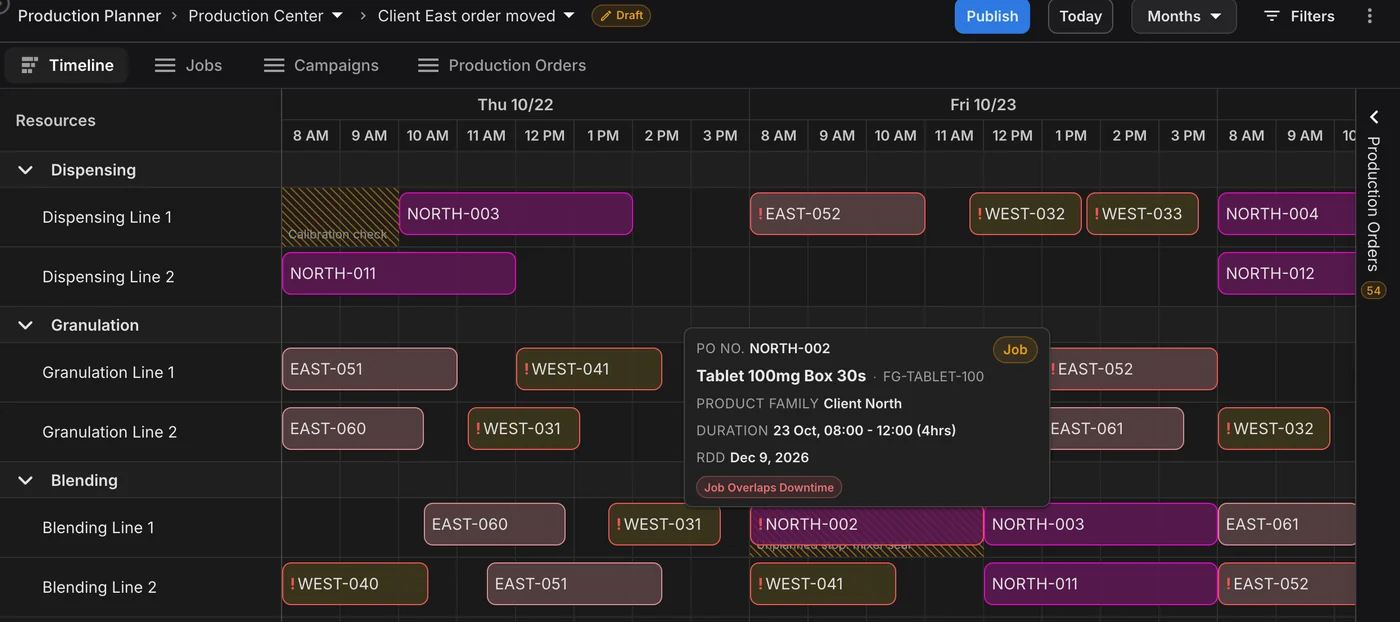
A line goes down, the job is flagged. Draft production schedule for Thursday and Friday: an unplanned stop on Blending Line 1 runs over Client North's NORTH-002, whose tooltip shows Job Overlaps Downtime; a calibration check takes Dispensing Line 1 out on Thursday morning.
Trusted by

Leading pharmaceutical companies

Azurity
Coripharma
MS Pharma
Navamedic
AGM Pharma
Adalvo
Frostpharma
CNX Therapeutics
Arcera
Sun Wave Pharma

On a shared line, every client’s change is your problem

A rush order for one client pushes another client’s batch. Late packaging stalls a third. The schedule is usually a spreadsheet that one person knows how to change, and they rebuild the week by hand.

The rules are simple one at a time. Across six lines and a week of orders, nobody can check them by eye.

A tablet after a cream needs changeover time on the blender. Granulation has to start within a set window after dispensing. On Thursday a calibration check takes a line out.

Miss one of those and the conflict turns up on the shop floor, or when a client calls to ask where their batch is.

Why it matters:

Clients pay for the delivery date. A clash found at your desk on Monday costs a few minutes. Found on the floor on Tuesday, it can cost a batch or a delivery date.
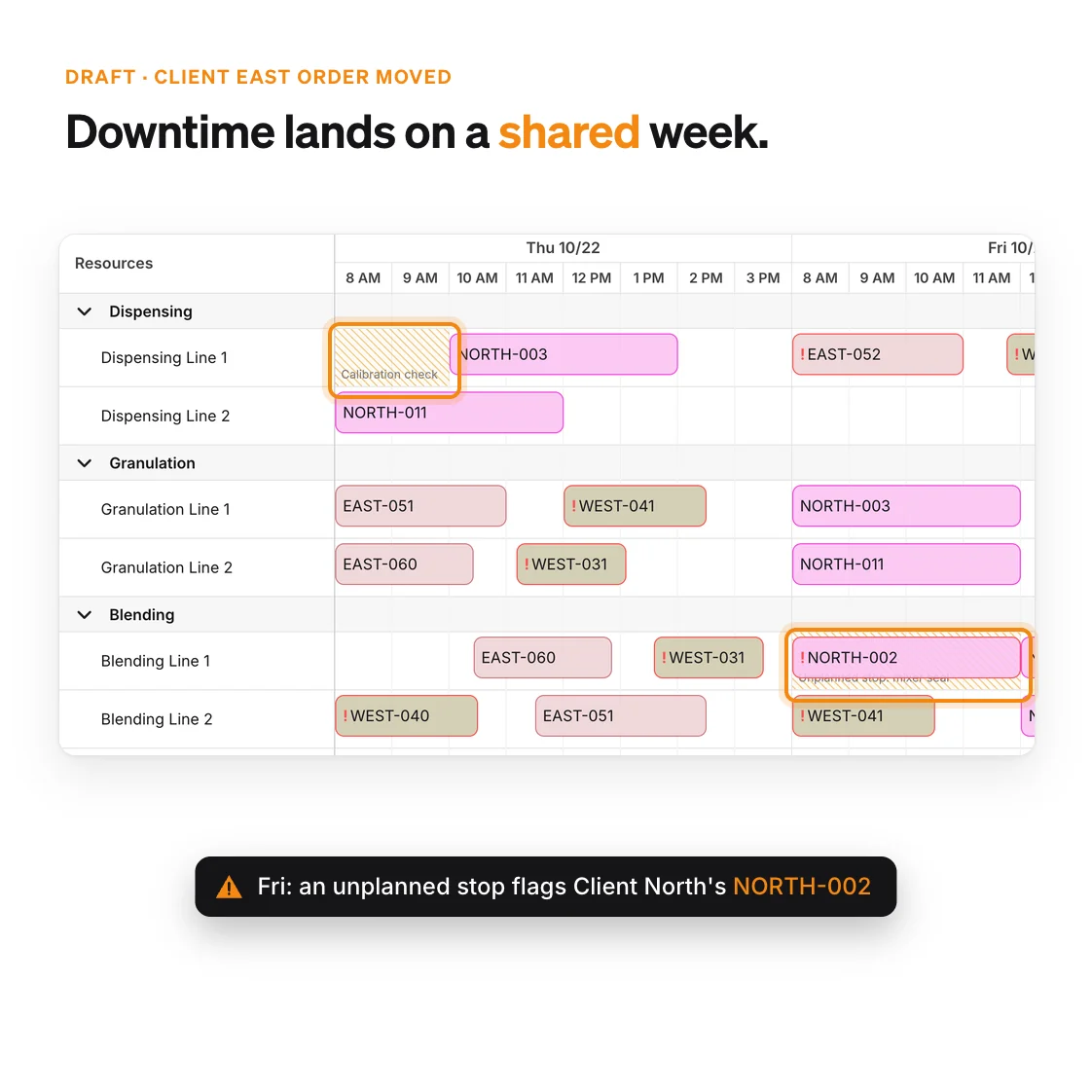
Thursday and Friday on shared lines with jobs from Client North, Client East and Client West: a calibration check takes Dispensing Line 1 out on Thursday and an unplanned stop on Blending Line 1 flags Client North's NORTH-002 on Friday

What a CMO schedule gets in PLAIO

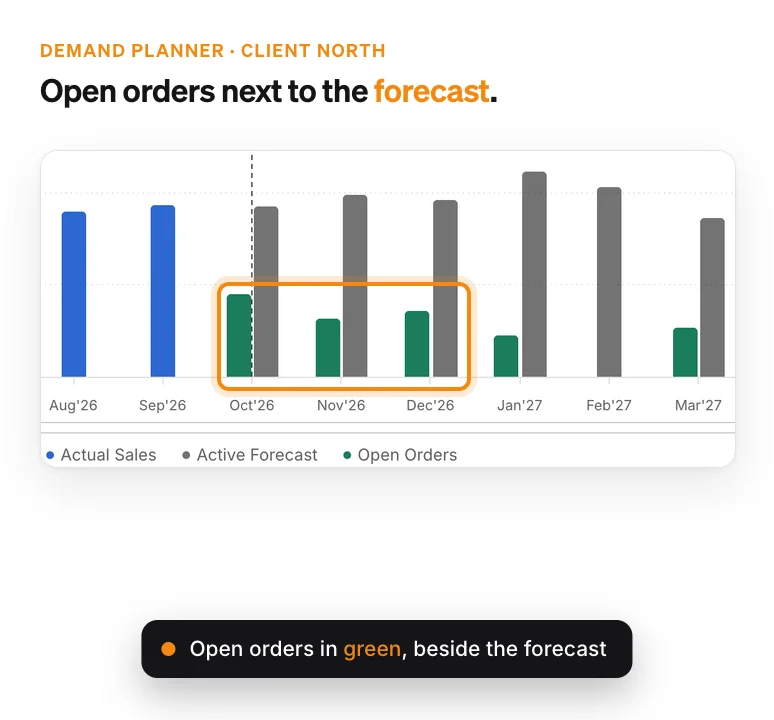
Demand chart for Client North: sales history to September 2026, then each month's forecast with the client's open orders beside it

Firm POs and forecasts in one plan

Each client’s open orders sit next to their forecast, month by month. Group the plan by client and you see how much of next quarter is already firm.
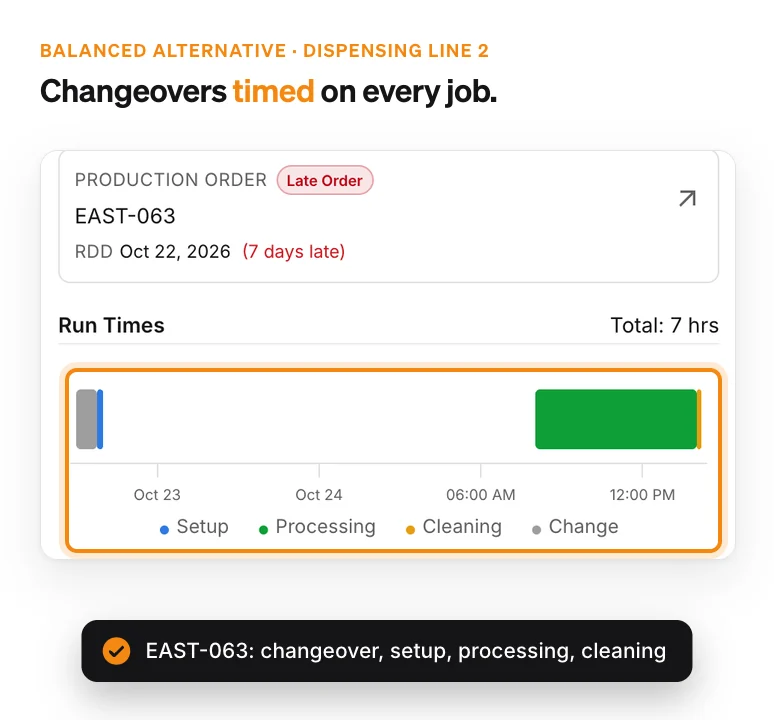
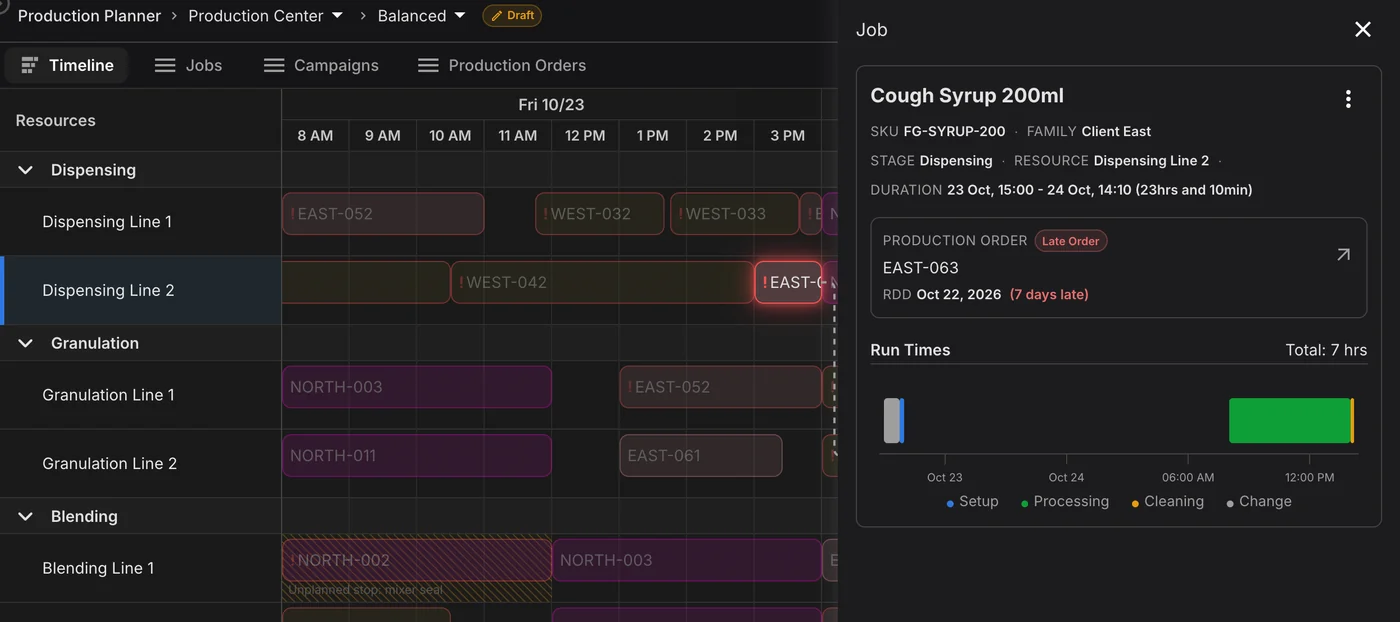
Job panel for Client East's EAST-063 on the optimizer's Balanced alternative: flagged Late Order, 7 days late, with run times split into changeover, setup, processing and cleaning

Weigh changeovers against late days

Changeover times depend on what ran before, and you set them per line. Every job shows its changeover, setup, run and cleaning time. The optimizer saves schedule alternatives that trade late orders against changeover time. You keep the one that suits the week.
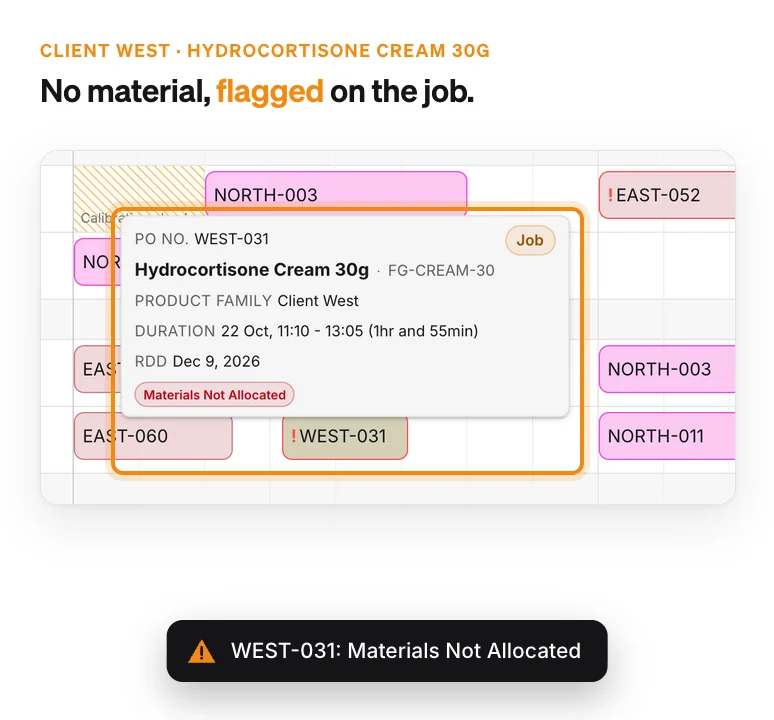
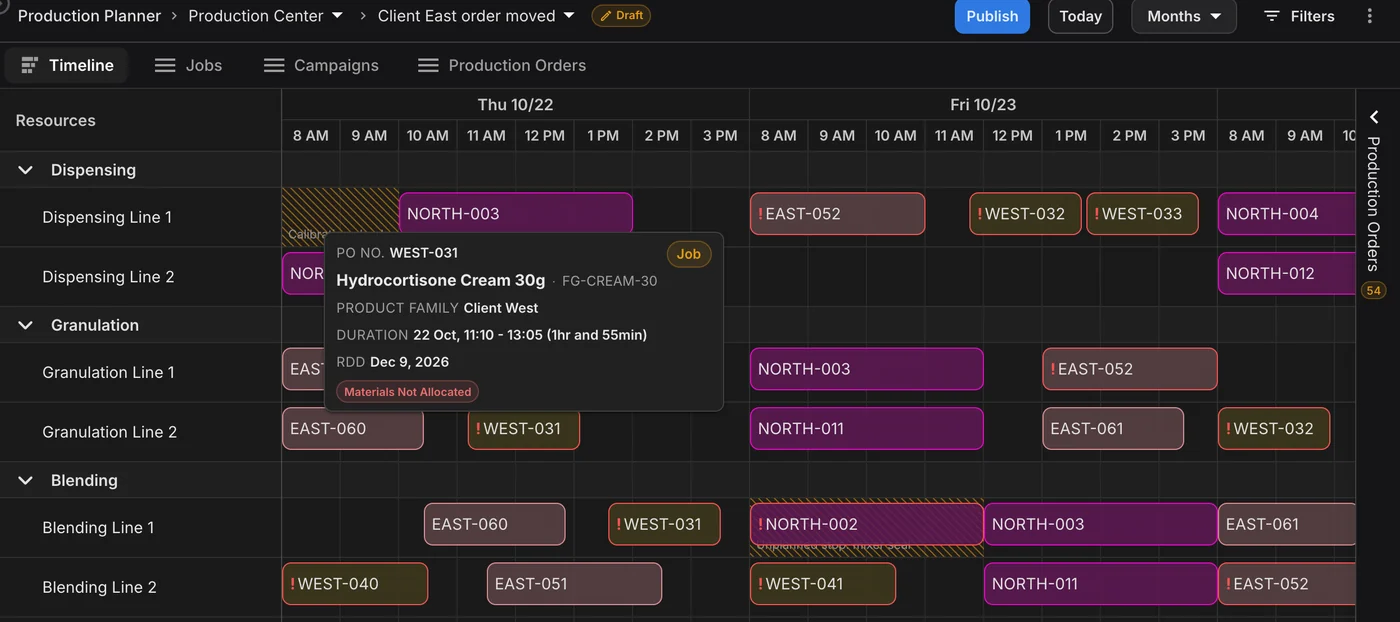
Client West's WEST-031 job on Granulation Line 2 with its tooltip: Hydrocortisone Cream 30g, 22 Oct 11:10 to 13:05, Materials Not Allocated

Each client’s materials checked

Components and packaging sit in each product’s bill of materials and arrive on lanes with their own lead time and MOQ. When the plan has no material for a job, or it won’t be there in time, the job is flagged.

How contract manufacturing scheduling works in PLAIO
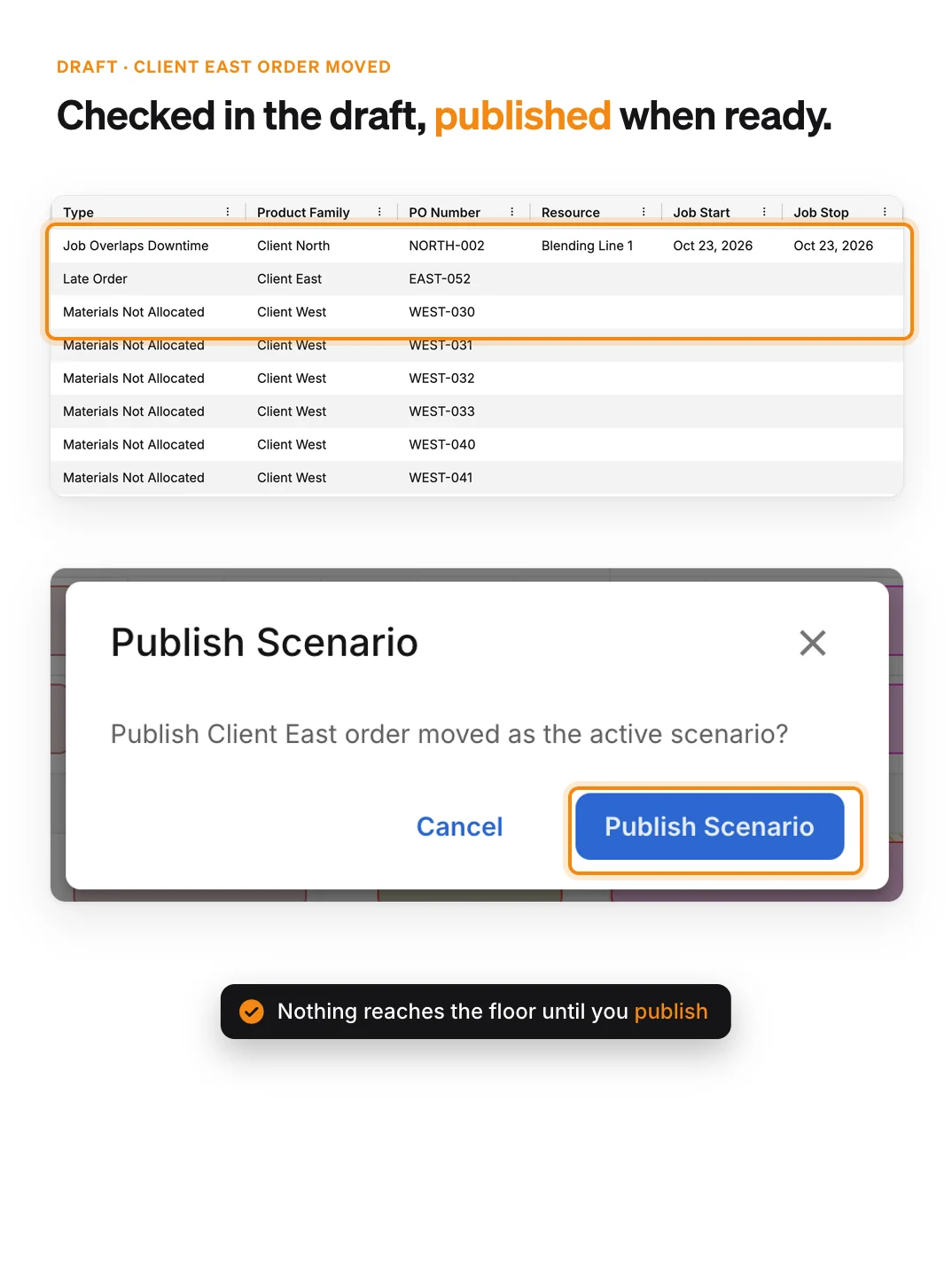
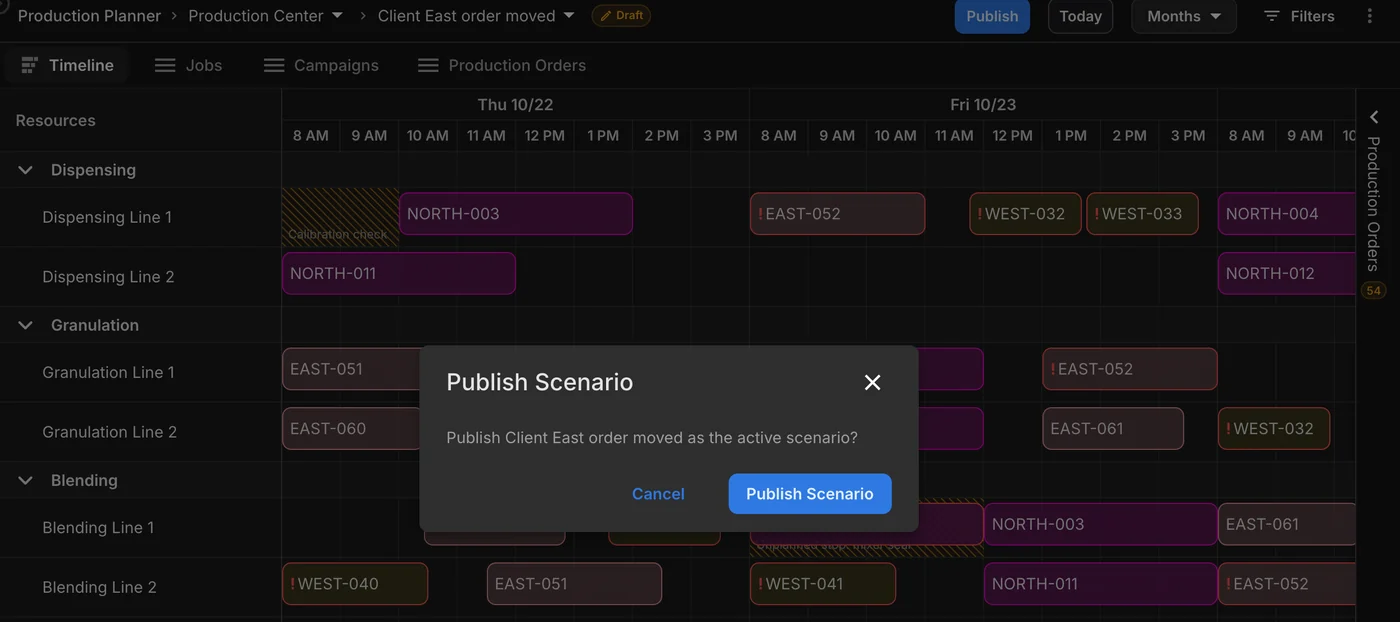
Production exceptions for the draft scenario 'Client East order moved': Job Overlaps Downtime on NORTH-002, Late Order on EAST-052 and Materials Not Allocated on six Client West orders, above the Publish Scenario dialog

Orders become jobs on named lines

A production order has an item, a quantity and a delivery date. Schedule it and you get a job for each routing step, on a named line with a start and stop time. Auto Schedule places the orders you pick around shifts and downtime.

Every job checked against the floor

PLAIO checks setup, run and cleaning times on each line, changeovers that depend on what ran before, waits between steps and the shift calendar. A job that breaks a rule shows up as an exception.

Client changes go into a draft

When a client moves a date, drag the jobs or try the change in a draft scenario next to the published schedule. The floor keeps working from the published one until you publish.

Hold line time for a client

With the optional Reservations module you block line time for a product family, such as one client’s products. Auto Schedule fills the block with matching orders and flags it if it is overbooked.

CMO planning software FAQ

It schedules. Each job has a line, a start and a stop time, and follows the item’s routing through your stages. PLAIO checks it against setup, run and cleaning times, sequence-dependent changeovers, minimum and maximum waits, shifts and downtime. Anything that breaks a rule appears as an exception.

Add the downtime and PLAIO can run a smart reschedule. It takes every job off the line from the downtime start onwards and fits those orders back in. If you want to compare options first, do it in a draft scenario the floor can’t see.

No. The ERP keeps executing. Orders, stock and master data reach PLAIO through the Integration API or an upload, and approved supply orders go back. Our customers run SAP (ECC and S/4HANA), NetSuite and Microsoft Dynamics 365 Business Central. PLAIO also works with Oracle, and we build the connection for you.

Most teams are planning in PLAIO within weeks. You can start on exports of your orders, routings and lines before the ERP connection is built, then move each dataset to the live feed without rebuilding the schedule.

PLAIO is the planning layer, and the ERP keeps executing as it was validated. Published schedules are never edited in place. A change is tried in a draft and only reaches the floor when someone publishes it, and approved supply orders go back to the ERP with the approver and time.

We put a week of client orders on shared lines and show what PLAIO catches: short changeovers, late orders and material that won’t be ready. Then we move one client’s order in a draft. Book a time.

SAP, Oracle, NetSuite and Microsoft Dynamics 365 Business Central are trademarks or registered trademarks of their respective owners. PLAIO is not affiliated with or endorsed by them.

Put a week of client orders on the Gantt

30 minutes on your own lines and clients. See which delivery is at risk while the week can still change.

Book my 30-minute demo Prefer to read first? Capacity planning for pharmaceutical manufacturing
Cookie settings

To enhance your experience on our site and to analyze traffic, we use cookies. By clicking "Accept All," you agree to the storing of cookies on your device for analytics purposes. You can manage your settings or learn more in our Privacy Policy.

Manage Settings
  • Your Privacy Matters to Us

    We use cookies to improve your browsing experience and analyze how our website is used. These cookies allow us to understand trends, monitor website traffic, and gather insights to make the site better for you.

    We respect your privacy and are committed to transparent data usage.

    Why Do We Use Cookies?

    Necessary Cookies: These ensure that the website functions properly.

    Analytics Cookies: These help us track site traffic, user behavior, and performance metrics. The data collected is anonymous and allows us to continuously optimize the site.

    Preferences Cookies: We may use cookies to remember your preferences and tailor your experience.

    Marketing Cookies: We may use cookies for marketing purposes.

    Your Control, Your Choice

    By clicking "Accept All," you consent to the use of all cookies. If you prefer, you can customize your choices and opt out of certain cookies. You can learn more about how we handle data and cookies in our Privacy Policy.